
Dayton, OH · Montgomery County
Claim Statement Form
The City of Dayton Claim Statement Form is a claim packet for people seeking compensation from the city for personal injury, vehicle damage, or other property damage.
- licensed online notary
- ~15 min average
- Notarized PDF emailed
What you’ll need
- Government-issued photo ID
- Webcam-enabled device (laptop or phone)
- This form, ready to upload as a PDF
What this form is
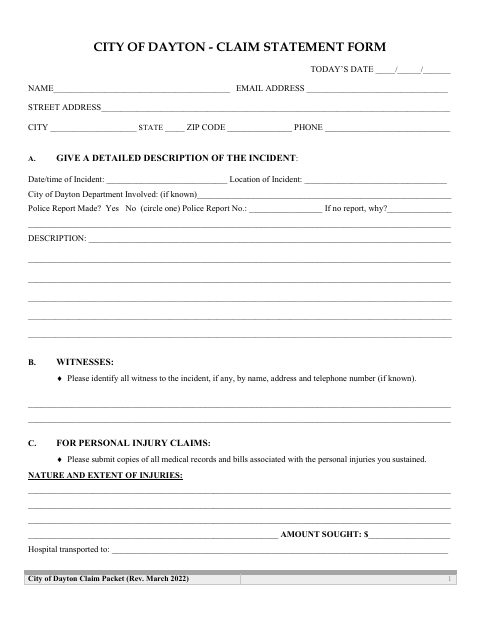
This four-page packet collects the claimant’s contact details, incident description, witnesses, and information about injuries or property damage. Claimants provide insurance details and supporting documents, and the form says to file an insurance claim before filing with the City of Dayton. The packet includes a sworn insurance statement for people who are uninsured or self-insured, a notary block, and an itemized property claim page.
Who needs it
People seeking compensation from the City of Dayton for an incident involving personal injury, vehicle damage, or other property damage use this packet.
Why it needs a notary
The packet has a sworn-or-affirmed and subscribed-before-me jurat; the claimant signs the insurance statement before the notary.
How to get this notarized
- 1
Download the Claim Packet
Get the City of Dayton Claim Statement Form and its itemized property claim page.
- 2
Fill Out the Form
Describe the incident, list witnesses, complete applicable injury or damage sections, and gather the requested insurance and supporting documents.
- 3
Book an Online Notary
Arrange a remote appointment with a commissioned online notary for the sworn or affirmed insurance statement.
- 4
Sign on Video
Show identification and sign the statement during the online notary session when instructed.
- 5
Submit to the City
Return the completed packet and supporting documents to the Dayton Law Department at the address shown on the form.
Preview the form
The blank PDF straight from Dayton. Look it over, then upload your filled copy to start the notary session.

You’ll need ID and a webcam.
A licensed online notary will join you on video, verify your government-issued ID, witness your signature, and apply their seal. You’ll receive the notarized PDF by email when the session ends.
Frequently asked questions
- How do I submit the Dayton Claim Statement Form?
- Complete the packet, attach the requested supporting records and insurance declaration page, and return it to the Dayton Law Department at the address printed on the form.
- Do I need to have the claim statement notarized?
- The packet includes a jurat for the claimant’s sworn or affirmed insurance statement. Sign that statement before the notary, and confirm with the city or village if unsure about how the requirement applies to your claim.
- Can I sign the claim statement with a commissioned online notary?
- Ohio authorizes online notarization by its commissioned notaries. Ask the City of Dayton whether it will accept your remotely notarized claim packet before submitting it.
- What documents should I include with the packet?
- The form requests a copy of your auto or homeowner’s insurance declaration page. It also asks for supporting medical records and bills for personal injury claims, or repair estimates and itemized property details when applicable.