
Lordstown, OH · Trumbull County
Income Tax Refund Claim
The Village of Lordstown Income Tax Refund Claim is for a nonresident or employer seeking a refund of income tax withheld or remitted in error to the village.
- licensed online notary
- ~15 min average
- Notarized PDF emailed
What you’ll need
- Government-issued photo ID
- Webcam-enabled device (laptop or phone)
- This form, ready to upload as a PDF
What this form is
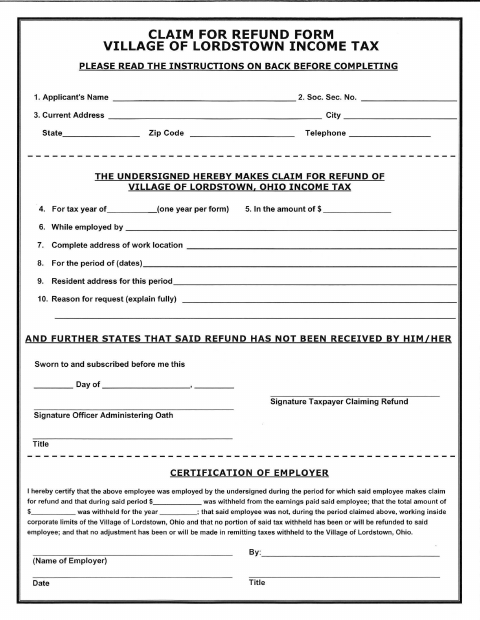
The form requests a refund for a nonresident who performed no work within Lordstown’s corporate limits or an employer that remitted employee withholding to the village in error. The taxpayer completes the claim, explains the reason, attaches a W-2 and supporting information, and signs under oath before a notary. The employer or an authorized officer or agent must also complete the employer certification.
Who needs it
A nonresident seeking a refund for tax withheld despite performing no service in Lordstown, or an employer seeking a refund for tax remitted in error, may file this form.
How to get this notarized
- 1
Download the Form
Get the Lordstown Income Tax Refund Claim and read the instructions on the back before completing it.
- 2
Complete the Claim
Fill in the taxpayer information, tax year, refund amount, employment details, and reason for the request. Attach a W-2 and supporting information.
- 3
Book an Online Notary
Schedule a session with a commissioned online notary to take your oath and notarize the claim.
- 4
Sign on Video
Sign the taxpayer claim during the online video session when directed by the notary.
- 5
Submit to the Village
Have the employer complete its certification, then submit the notarized claim and attachments to the Village of Lordstown.
Preview the form
The blank PDF straight from Lordstown. Look it over, then upload your filled copy to start the notary session.

You’ll need ID and a webcam.
A licensed online notary will join you on video, verify your government-issued ID, witness your signature, and apply their seal. You’ll receive the notarized PDF by email when the session ends.
Frequently asked questions
- How do I notarize the Lordstown refund claim online?
- Complete the taxpayer section and gather your W-2 and supporting information. Book an appointment with a commissioned online notary, sign during the video session, then submit the claim and attachments to the village.
- Do I need to notarize this income tax refund claim?
- Yes. The form instructs the taxpayer to make the claim under oath and includes a “Sworn to and subscribed before me” jurat for the officer administering the oath.
- Can I use an online notary for this form?
- Ohio authorizes online notarization by its notaries under R.C. §§147.60–147.66. Use a commissioned online notary and confirm with the city or village if unsure.
- What should I include with my refund claim?
- The instructions ask for a copy of the W-2 and any information or forms supporting the claim. File a separate claim for each calendar year, and have the employer or an authorized officer or agent complete the employer certification.
Other forms in Lordstown
Income Tax Refund Claim in other Ohio cities
Each city publishes its own version of this form. Pick the city where you’re filing.