
Coatesville, PA · Chester County
As-Is Agreement of Sale/Transfer
The City of Coatesville As-Is Agreement of Sale/Transfer records a buyer’s acceptance of a property’s condition and is filed by buyers transferring real estate in the city.
- licensed online notary
- ~15 min average
- Notarized PDF emailed
What you’ll need
- Government-issued photo ID
- Webcam-enabled device (laptop or phone)
- This form, ready to upload as a PDF
What this form is
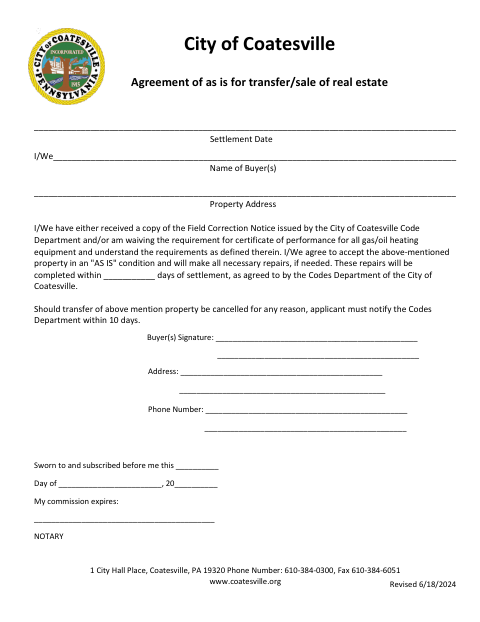
This agreement documents the buyer’s acceptance of a property in its current condition and commitment to complete necessary repairs within the number of days agreed to by the Codes Department. It also records whether the buyer received a Field Correction Notice and/or is waiving the certificate-of-performance requirement for gas or oil heating equipment. The form is used for a real estate sale or transfer in Coatesville.
Who needs it
Buyers named on a Coatesville real estate sale or transfer use this form to accept the property as-is and acknowledge the stated repair and notice terms.
Why it needs a notary
The form has a “Sworn to and subscribed before me” jurat; the buyer or buyers sign the acceptance before a notary.
How to get this notarized
- 1
Download The Form
Get the City of Coatesville As-Is Agreement of Sale/Transfer.
- 2
Fill In The Details
Enter the buyer names, property address, settlement date, and agreed repair period.
- 3
Book An Online Notary
Schedule a session with a commissioned online notary.
- 4
Sign On Video
Sign the buyer acceptance in the notary’s presence during the video session.
- 5
Submit To The City
Send the completed, notarized form to the City of Coatesville as directed.
Preview the form
The blank PDF straight from Coatesville. Look it over, then upload your filled copy to start the notary session.

You’ll need ID and a webcam.
A licensed online notary will join you on video, verify your government-issued ID, witness your signature, and apply their seal. You’ll receive the notarized PDF by email when the session ends.
Frequently asked questions
- How do I notarize the Coatesville As-Is Agreement?
- Complete the form, then book an online appointment with a commissioned online notary. Sign the buyer acceptance during the video session, and submit the notarized form as directed by the City of Coatesville.
- Do I need to sign this agreement before a notary?
- Yes. The form includes a “Sworn to and subscribed before me” section and a line for the notary’s commission expiration. The buyer or buyers sign before the notary.
- Can I use an online notary for this form?
- Pennsylvania authorizes remote online notarization by its own notaries under 57 Pa.C.S. §306.1. Confirm with the City of Coatesville that it will accept the remotely notarized form for your transaction.
- When is the agreement used?
- The form records a buyer’s as-is acceptance for a Coatesville real estate sale or transfer. It also addresses a Field Correction Notice and/or waiver of the certificate-of-performance requirement for gas or oil heating equipment.
- What if I am unsure whether the city needs this form?
- The form concerns a Coatesville property transfer and refers to the Codes Department’s Field Correction Notice and certificate-of-performance requirement. Confirm with the city, borough or township if unsure.