
East Greenwich, RI · Kent County
Business Personal Property Annual Return
East Greenwich businesses use this annual return to declare real estate and personal property owned or possessed in town for the Tax Assessor’s valuation.
- licensed online notary
- ~15 min average
- Notarized PDF emailed
What you’ll need
- Government-issued photo ID
- Webcam-enabled device (laptop or phone)
- This form, ready to upload as a PDF
What this form is
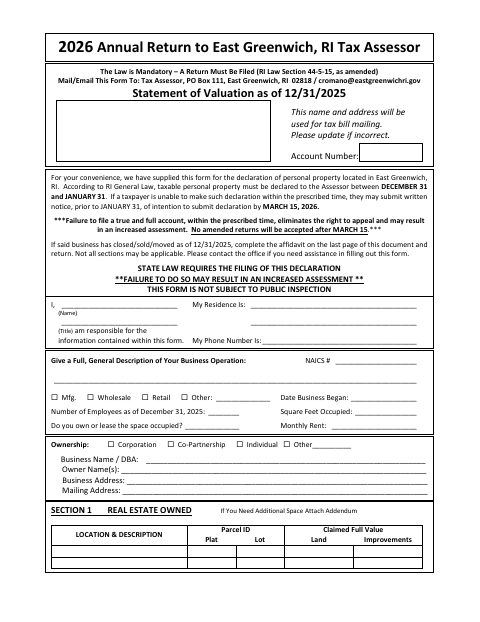
The return reports business property as of December 31, 2025, including equipment, supplies, leasehold improvements, and property leased to others. The form says the declaration must be filed between December 31 and January 31, or the business must notify the Assessor before January 31 if it intends to file by March 15, 2026. It warns that missing the deadline may increase the assessment and eliminate the right to appeal.
Who needs it
Businesses owning or possessing ratable real estate or personal property in East Greenwich on December 31, 2025, must complete and return the declaration to the Tax Assessor.
Why it needs a notary
The signer completes the Section 11 declaration and signs before a notary, who records the oath, signature, date, and commission expiration.
How to get this notarized
- 1
Download the Return
Get the 2026 Annual Return from the East Greenwich website.
- 2
Complete the Applicable Sections
Provide business and property details, and attach separate schedules where needed.
- 3
Book an Online Notary
Arrange a remote notarization with a commissioned online notary.
- 4
Sign on Video
Sign the declaration and take the oath during your online notary session.
- 5
Submit to the Tax Assessor
Mail or email the completed return to the East Greenwich Tax Assessor as shown on the form.
Preview the form
The blank PDF straight from East Greenwich. Look it over, then upload your filled copy to start the notary session.

You’ll need ID and a webcam.
A licensed online notary will join you on video, verify your government-issued ID, witness your signature, and apply their seal. You’ll receive the notarized PDF by email when the session ends.
Frequently asked questions
- How do I file the East Greenwich annual return?
- Complete the return, sign the declaration before a notary, and send it to the Tax Assessor by mail or email using the contact details on the form.
- Do I need to notarize this return?
- Yes. The form states that it must be notarized. Its Section 11 includes a declaration and an oath block for the signer and notary.
- Can I sign this return with a commissioned online notary?
- Rhode Island authorizes remote online notarization for its own notaries under R.I. Gen. Laws §§42-30.1-12.1 and 42-30.1-12.2. Check with the Tax Assessor whether the completed return meets its submission requirements.
- What if I’m unsure where to send a municipal form?
- This return directs businesses to the East Greenwich Tax Assessor. For questions about municipal records or filing, confirm with the city or town clerk if unsure.
Other forms in East Greenwich
Disabled Tax Credit Application
East Greenwich
Income Credit Exemption Application
East Greenwich
Senior Exemption Application
East Greenwich
Trade Name Certificate
East Greenwich
Trade Name Certificate Cancellation
East Greenwich
Veterans, Widow of Veteran, and 100% Disabled Veteran Exemption Application
East Greenwich