
East Greenwich, RI · Kent County
Disabled Tax Credit Application
This application requests East Greenwich’s disability tax credit and is filed by residents who meet the form’s residency and Social Security disability documentation requirements.
- licensed online notary
- ~15 min average
- Notarized PDF emailed
What you’ll need
- Government-issued photo ID
- Webcam-enabled device (laptop or phone)
- This form, ready to upload as a PDF
What this form is
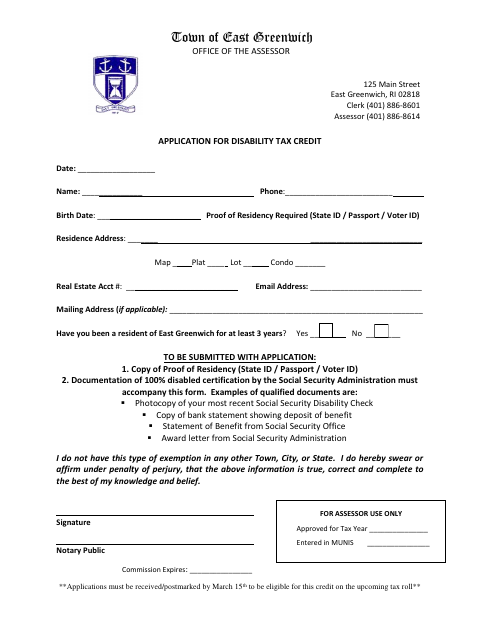
The form asks for the applicant’s contact and residence information, proof of residency, and documentation of 100% disability certification by the Social Security Administration. Applicants also affirm that they do not have this type of exemption in another town, city, or state. The application and supporting documents must be received or postmarked by March 15 to be eligible for the credit on the upcoming tax roll.
Who needs it
East Greenwich residents applying for the disability tax credit who can provide proof of residency and documentation of 100% Social Security disability certification need this form.
Why it needs a notary
The applicant signs the sworn certification before the notary, whose block records the notary public’s commission expiration; the form does not specify a jurat or acknowledgment label.
How to get this notarized
- 1
Download The Application
Get the Disabled Tax Credit Application from the Town of East Greenwich.
- 2
Complete The Form
Enter your contact, residence, and property information and gather the required proof of residency and disability documentation.
- 3
Book An Online Notary
Arrange a session with a commissioned online notary for the applicant’s sworn certification.
- 4
Sign On Video
Sign the certification during the online notarization session and follow the notary’s instructions.
- 5
Submit To The Town
Send the application and supporting documents to the assessor by the form’s March 15 deadline.
Preview the form
The blank PDF straight from East Greenwich. Look it over, then upload your filled copy to start the notary session.

You’ll need ID and a webcam.
A licensed online notary will join you on video, verify your government-issued ID, witness your signature, and apply their seal. You’ll receive the notarized PDF by email when the session ends.
Frequently asked questions
- How do I get the disability tax credit application notarized?
- Complete the form and gather the required proof of residency and Social Security disability documentation. Book a commissioned online notary, sign the certification during the video session, then submit the application and supporting documents.
- Do I need to provide documents with this application?
- Yes. The form requires proof of residency and documentation of 100% disabled certification by the Social Security Administration, such as a benefit statement, deposit record, check copy, or award letter.
- Can I sign this application with a commissioned online notary?
- Rhode Island permanently authorizes remote online notarization for its own notaries under R.I. Gen. Laws §§42-30.1-12.1 and 42-30.1-12.2. Confirm the receiving office will accept the remotely notarized form if unsure.
- When must I submit the application?
- The form says applications must be received or postmarked by March 15 to be eligible for the credit on the upcoming tax roll. Contact the assessor with questions about filing.
- Where should I ask if I am unsure where to file?
- The form is issued by the Town of East Greenwich Office of the Assessor. Confirm with the city or town clerk if unsure.
Other forms in East Greenwich
Business Personal Property Annual Return
East Greenwich
Income Credit Exemption Application
East Greenwich
Senior Exemption Application
East Greenwich
Trade Name Certificate
East Greenwich
Trade Name Certificate Cancellation
East Greenwich
Veterans, Widow of Veteran, and 100% Disabled Veteran Exemption Application
East Greenwich