
Warwick, RI · Kent County
City Claim Form and Affidavit
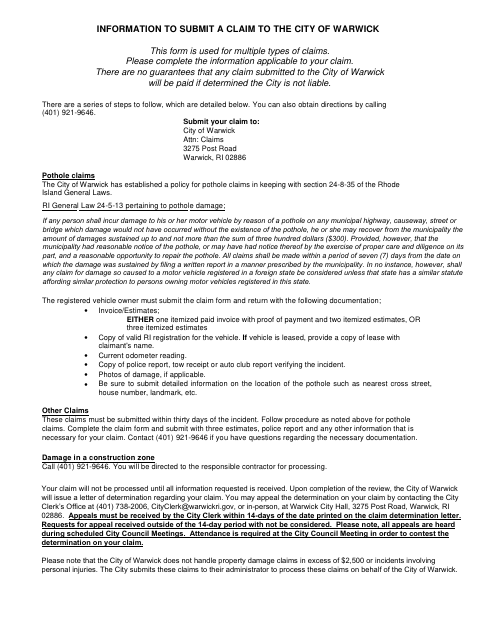
This form lets people submit a claim to the City of Warwick for certain losses, including vehicle damage, pothole damage, property damage, and tax-related claims.
- licensed online notary
- ~15 min average
- Notarized PDF emailed
What you’ll need
- Government-issued photo ID
- Webcam-enabled device (laptop or phone)
- This form, ready to upload as a PDF
What this form is
Use the form to describe the incident, request reimbursement, and provide details about the loss and any other compensation received or being sought. The City says pothole claims and other claims require supporting documentation, and claims will not be processed until all requested information is received. The form includes an affidavit that the claimant must sign before a notary. Submit the completed claim and supporting materials to the City’s Claims address.
Who needs it
A person seeking reimbursement from the City of Warwick for a covered loss should complete the applicable sections and submit the requested supporting information.
How to get this notarized
- 1
Download The Claim Form
Get the City of Warwick claim form and review the instructions for the type of claim you are making.
- 2
Complete The Applicable Fields
Fill in the incident, claimant, and loss details, and gather the supporting materials requested for your claim.
- 3
Book An Online Notary
Schedule a remote online notarization for the affidavit section, which must be sworn before a notary.
- 4
Sign On Video
Meet with a commissioned online notary and sign the affidavit during the video session.
- 5
Submit To The City
Send the completed form and requested supporting documents to the City of Warwick Claims address shown on the form.
Preview the form
The blank PDF straight from Warwick. Look it over, then upload your filled copy to start the notary session.

You’ll need ID and a webcam.
A licensed online notary will join you on video, verify your government-issued ID, witness your signature, and apply their seal. You’ll receive the notarized PDF by email when the session ends.
Frequently asked questions
- How do I submit the Warwick claim form?
- Complete the sections that apply to your claim, gather the supporting documents requested for your claim type, and submit them to the City of Warwick Claims address listed on the form.
- Do I need to sign the affidavit in front of a notary?
- Yes. The affidavit has a subscribed-and-sworn jurat and a notary block. Sign it before the notary, rather than signing it in advance.
- Can I sign the Warwick claim affidavit online?
- Rhode Island permanently authorized remote online notarization for its own notaries in 2022. A commissioned online notary can notarize a remotely located signer under R.I. Gen. Laws §§42-30.1-12.1 and 42-30.1-12.2.
- What documents should I include with a claim?
- The form lists different supporting materials by claim type, including estimates or invoices, vehicle registration, and incident documentation for pothole claims. Contact the City at the number on the form if you have questions.
- Where should I ask if I am unsure about filing?
- The form gives the City’s Claims contact information for questions. For questions about municipal filing requirements, confirm with the city or town clerk if unsure.
Other forms in Warwick
Affidavit of Compliance RI Bank Program
Warwick
Affidavit of Compliance for Non-Owner-Occupied or Non-Residential Property
Warwick
Subdivision and Land Development Application
Warwick
Property Tax Exemption Application
Warwick
Short-Term Rental Owner’s Affidavit
Warwick
Subdivision and Land Development Application
Warwick