
Woonsocket, RI · Providence County
Section 3 Business Application
Woonsocket businesses use this optional application to document Section 3 eligibility and request preference for bidding on contracts connected with HUD-funded projects.
- licensed online notary
- ~15 min average
- Notarized PDF emailed
What you’ll need
- Government-issued photo ID
- Webcam-enabled device (laptop or phone)
- This form, ready to upload as a PDF
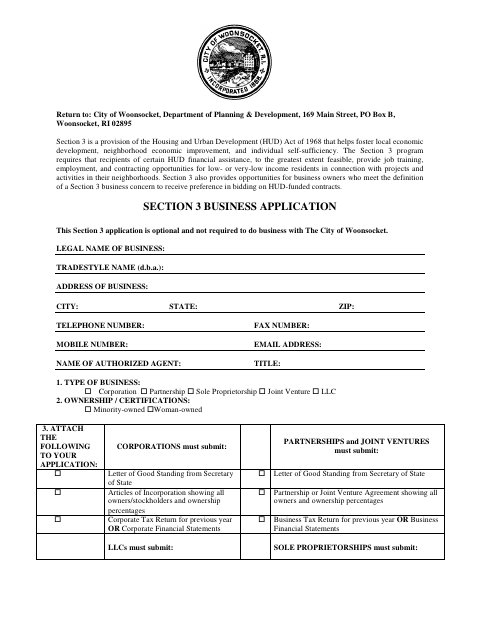
What this form is
This application collects business details, ownership information, eligibility claims, and supporting records for a business seeking Section 3 status. The form says the application is optional and is not required to do business with the City of Woonsocket. Businesses may submit it when seeking Section 3 preference for HUD-funded contracts, and must include the documents and additional forms listed for their business type and eligibility basis.
Who needs it
A business seeking Section 3 status or bidding preference for HUD-funded contracts in Woonsocket may submit this optional application with the required supporting documents.
Why it needs a notary
The form provides a notary line but does not identify a jurat or acknowledgment; the person signing the certification should sign before the notary.
How to get this notarized
- 1
Download The Application
Get the Section 3 Business Application from the City of Woonsocket.
- 2
Complete The Form
Enter business and ownership details, select the applicable eligibility basis, and gather the supporting documents listed for your business type.
- 3
Book An Online Notary
Arrange an appointment with a commissioned online notary for the person who will sign the application.
- 4
Sign On Video
Sign the application during the online notary session and complete the notarial act.
- 5
Submit To The City
Send the signed application and required supporting documents to the Woonsocket Department of Planning & Development.
Preview the form
The blank PDF straight from Woonsocket. Look it over, then upload your filled copy to start the notary session.

You’ll need ID and a webcam.
A licensed online notary will join you on video, verify your government-issued ID, witness your signature, and apply their seal. You’ll receive the notarized PDF by email when the session ends.
Frequently asked questions
- How do I submit the Section 3 Business Application?
- Complete the application, include the supporting documents and other forms required for your eligibility basis, and return it to the City of Woonsocket Department of Planning & Development at the address on the form.
- Do I need to complete this application to do business with Woonsocket?
- No. The form states that the Section 3 application is optional and is not required to do business with the City of Woonsocket.
- Can I sign this application with a commissioned online notary?
- Rhode Island law permits remote online notarization by a commissioned online notary under R.I. Gen. Laws §§42-30.1-12.1 and 42-30.1-12.2. The form does not specify the notarial certificate type; confirm with the city or town clerk if unsure.