
Mount Pleasant, SC · Charleston County
Non-Licensed Owner’s Intent to Build
This notice documents an owner’s intent to build or improve a residence under a licensing exemption and is filed with the Charleston County Register of Deeds for a Mount Pleasant permit.
- licensed online notary
- ~15 min average
- Notarized PDF emailed
What you’ll need
- Government-issued photo ID
- Webcam-enabled device (laptop or phone)
- This form, ready to upload as a PDF
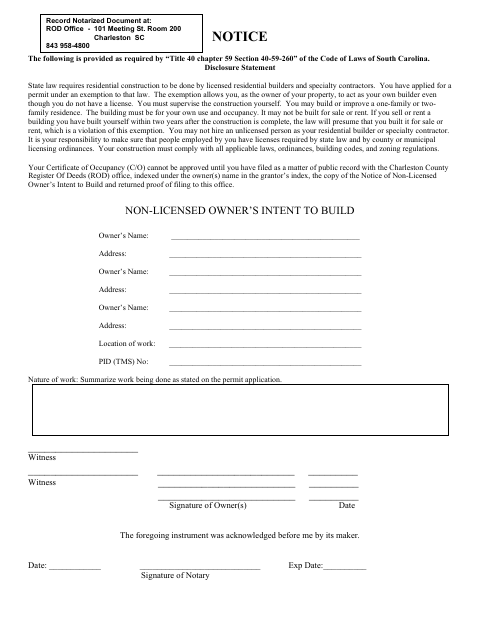
What this form is
The notice identifies the property owner, work location, parcel number, and planned work, and explains the owner’s responsibilities when building under the licensing exemption. Mount Pleasant requires the completed notice to be filed in the public record with the Charleston County Register of Deeds, indexed under the owner’s name, before the Certificate of Occupancy can be approved. The owner must return proof of filing to the city.
Who needs it
Property owners applying for a permit under the non-licensed owner exemption must complete this notice for residential construction or improvements in Mount Pleasant.
Why it needs a notary
The form has an acknowledgment stating the instrument was acknowledged before the notary by its maker; each owner signing the notice must acknowledge the signature before a notary.
How to get this notarized
- 1
Download the Notice
Get the Non-Licensed Owner’s Intent to Build form from Mount Pleasant.
- 2
Complete the Owner and Work Details
Enter each owner’s name and address, the work location, PID (TMS) number, and a summary of the permitted work.
- 3
Book an Online Notary
Arrange notarization with a commissioned online notary and confirm the city and county will accept the notarial certificate and filing.
- 4
Sign Before the Notary
Each owner signing the notice acknowledges the signature before the notary.
- 5
Submit the Notice for Recording
File the notarized notice with the Charleston County Register of Deeds, then return proof of filing to Mount Pleasant.
Preview the form
The blank PDF straight from Mount Pleasant. Look it over, then upload your filled copy to start the notary session.

You’ll need ID and a webcam.
A licensed online notary will join you on video, verify your government-issued ID, witness your signature, and apply their seal. You’ll receive the notarized PDF by email when the session ends.
Frequently asked questions
- How do I file the Non-Licensed Owner’s Intent to Build?
- Complete the owner, property, and work details, sign before a notary, then file the notice with the Charleston County Register of Deeds. Return proof of filing to Mount Pleasant.
- Do I need to record this notice before my Certificate of Occupancy?
- Yes. The form says the Certificate of Occupancy cannot be approved until the notice is filed in the public record and proof of filing is returned to the city.
- Can I use a commissioned online notary for this form?
- South Carolina has not authorized its own notaries to perform remote online notarizations. A notarial certificate valid under federal law or the law where it was made may be recognized in South Carolina; confirm acceptance with the city or county before proceeding.
- Where do I record the notarized notice?
- The form directs owners to record the notice with the Charleston County Register of Deeds, indexed under the owner’s name. Confirm recording procedures with the county.
- Can the owner rent or sell the residence after building?
- The form states that the building must be for the owner’s use and occupancy, not for sale or rent, and explains that selling or renting within two years after construction is complete triggers a presumption described in the disclosure.