
Columbia, TN · Maury County
Temporary Vending Permit Exemption
This affidavit is for a Columbia vendor claiming an exemption from the city’s Temporary Vending Permit and is submitted to the City Recorder.
- licensed online notary
- ~15 min average
- Notarized PDF emailed
What you’ll need
- Government-issued photo ID
- Webcam-enabled device (laptop or phone)
- This form, ready to upload as a PDF
What this form is
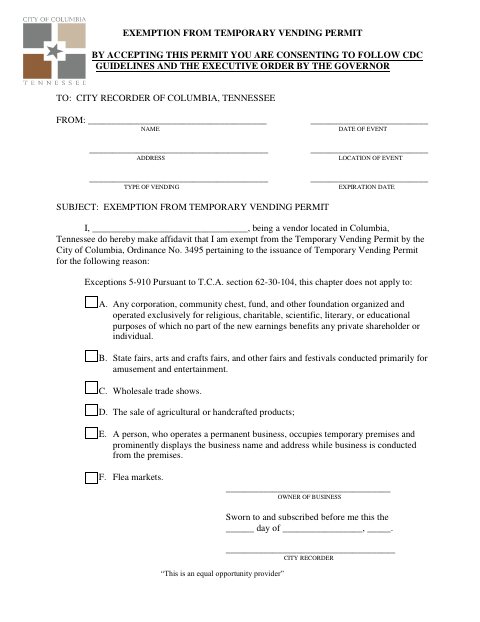
Use this form to tell the City Recorder that your business qualifies for an exemption from Columbia’s Temporary Vending Permit. The form asks for vendor and event details, the exemption reason, and the business owner’s sworn statement. Its listed exceptions include certain nonprofit organizations, fairs and festivals, wholesale trade shows, agricultural or handcrafted product sales, some permanent businesses operating from temporary premises, and flea markets.
Who needs it
A Columbia vendor who believes their business or event fits one of the listed exceptions and is claiming exemption from the Temporary Vending Permit needs this form.
How to get this notarized
- 1
Download the Form
Get the Temporary Vending Permit Exemption form from the City of Columbia.
- 2
Fill In the Details
Provide the requested vendor, event, location, vending type, and expiration information, and identify your claimed exemption.
- 3
Book an Online Notary
Arrange an online notarization with a commissioned online notary, if the city confirms it accepts one for this form.
- 4
- 5
Submit to the City
Send the completed form to the City Recorder of Columbia.
Preview the form
The blank PDF straight from Columbia. Look it over, then upload your filled copy to start the notary session.

You’ll need ID and a webcam.
A licensed online notary will join you on video, verify your government-issued ID, witness your signature, and apply their seal. You’ll receive the notarized PDF by email when the session ends.
Frequently asked questions
- How do I complete the Temporary Vending Permit Exemption?
- Enter the requested vendor and event details, identify the applicable exemption, and make the sworn statement before the City Recorder named on the form.
- Do I need to sign this form in front of a notary?
- The form includes a “Sworn to and subscribed before me” jurat and a City Recorder signature line. Sign the affidavit before the official who administers the oath.
- Can I use an online notary for this affidavit?
- Tennessee authorizes remote online notarization by a commissioned online notary. The form names the City Recorder in its jurat, so confirm with the city or town if unsure whether it accepts remote notarization for this form.
- Where do I submit the completed affidavit?
- The form is addressed to the City Recorder of Columbia, Tennessee. Submit the completed affidavit to the city.