
College Station, TX · Brazos County
Private Improvement in Public Right-of-Way Indemnification
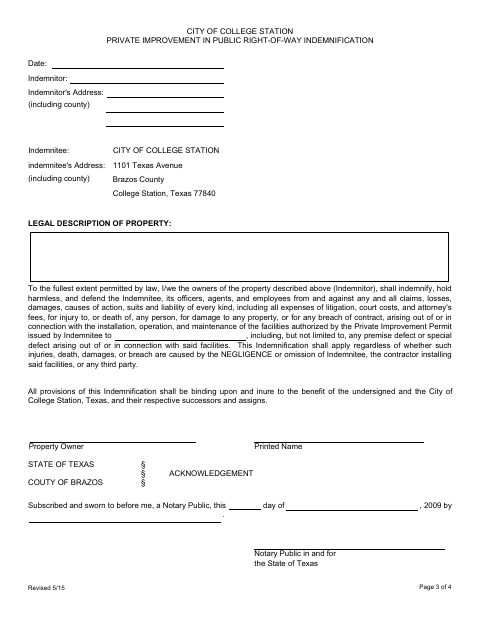
This indemnification form records a property owner’s promise to protect the City of College Station from certain claims connected to permitted facilities in public right-of-way.
- licensed online notary
- ~15 min average
- Notarized PDF emailed
What you’ll need
- Government-issued photo ID
- Webcam-enabled device (laptop or phone)
- This form, ready to upload as a PDF
What this form is
The form identifies the property and owner and sets out the owner’s agreement to indemnify, hold harmless, and defend the City of College Station against specified claims connected to facilities authorized by a Private Improvement Permit. Property owners use it in connection with installation, operation, and maintenance of those facilities in public right-of-way. The form includes a sworn-and-subscribed notary block for the owner’s signature.
Who needs it
A property owner named as the indemnitor for facilities authorized by a City of College Station Private Improvement Permit in public right-of-way needs this form.
How to get this notarized
- 1
Download the Form
Get the City of College Station Private Improvement in Public Right-of-Way Indemnification form.
- 2
Fill In the Form
Enter the property description, owner and address information, date, and other requested details.
- 3
Book an Online Notary
Schedule a remote session with a commissioned online notary and have identification ready.
- 4
Take the Oath and Sign
Join the video session, take the oath, and sign the indemnification as directed by the notary.
- 5
Submit It to the City
Download the notarized form and submit it to the City of College Station as directed for your permit.
Preview the form
The blank PDF straight from College Station. Look it over, then upload your filled copy to start the notary session.

You’ll need ID and a webcam.
A licensed online notary will join you on video, verify your government-issued ID, witness your signature, and apply their seal. You’ll receive the notarized PDF by email when the session ends.
Frequently asked questions
- How do I notarize this indemnification form online?
- Complete the form, then book a session with a commissioned online notary. Take the oath and sign during the video session, then submit the notarized form to the city.
- Do I need to take an oath for this form?
- Yes. The notary block says the owner’s signature is subscribed and sworn to before a notary, so be prepared to take an oath during notarization.
- Can I use an online notary for this Texas form?
- Texas has authorized remote online notarization since 2018 under Government Code Chapter 406, Subchapter C. A commissioned online notary can notarize the oath and signature by video.
- Who signs the indemnification?
- The property owner identified as the indemnitor signs the form. The form includes a notary block for the property owner’s printed name and sworn signature.
- What if I am unsure whether the city requires this form?
- The form connects the indemnification to a Private Improvement Permit for facilities in public right-of-way. Contact the City of College Station about your permit and confirm with the city if unsure.
Other forms in College Station
Abandonment of Public Right-of-Way/Easement Application
College Station
Itinerant Vendor Permit Notary Page
College Station
License to Encroach Upon a Public Utility Easement
College Station
Alternative Parking Plan Agreement Signature Page
College Station
Pedicab Driver Permit Application
College Station
Pedicab Permit Application and Inspection
College Station