
Lancaster, TX · Dallas County
Contractor Registration Application
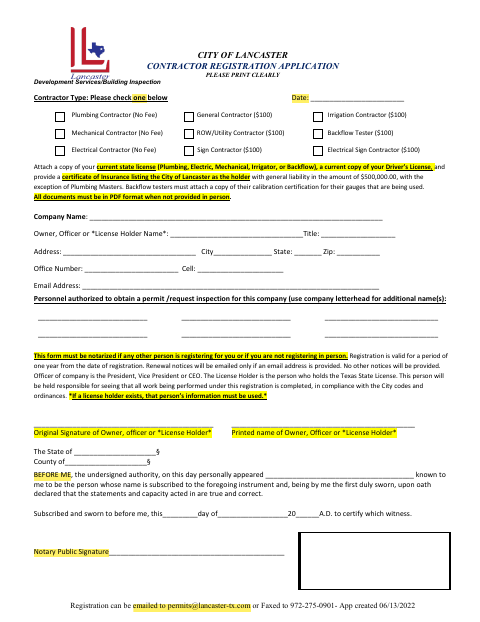
The Contractor Registration Application registers a contractor or company with Lancaster’s Development Services/Building Inspection department to perform work and request permits or inspections.
- licensed online notary
- ~15 min average
- Notarized PDF emailed
What you’ll need
- Government-issued photo ID
- Webcam-enabled device (laptop or phone)
- This form, ready to upload as a PDF
What this form is
Contractors use this form to provide company, owner or license holder, contact, and authorized personnel information. Lancaster requires notarization if someone else registers on the contractor’s behalf or if the contractor does not register in person; the registration is valid for one year. Applicants must also provide the listed license, identification, and insurance documents, with additional calibration certification required for backflow testers.
Who needs it
Contractors registering with Lancaster need this application, and notarization is required if another person registers for them or they do not register in person.
Why it needs a notary
The form has a jurat: the owner, company officer, or license holder whose information is used signs and swears that the statements are true and correct.
How to get this notarized
- 1
Download the Application
Get the Contractor Registration Application from the City of Lancaster and review the listed requirements.
- 2
Fill In the Form
Enter the company and owner, officer, or license holder details, select a contractor type, and list authorized personnel.
- 3
Book an Online Notary
If you are not registering in person or someone else is registering for you, arrange a commissioned online notary for the jurat.
- 4
Sign on Video
Appear before the notary, take the oath, and sign the application as the owner, officer, or license holder whose information is used.
- 5
Submit to the City
Send the completed application and required documents to Lancaster by email or fax, following the form’s PDF instructions.
Preview the form
The blank PDF straight from Lancaster. Look it over, then upload your filled copy to start the notary session.

You’ll need ID and a webcam.
A licensed online notary will join you on video, verify your government-issued ID, witness your signature, and apply their seal. You’ll receive the notarized PDF by email when the session ends.
Frequently asked questions
- How do I complete the contractor registration application?
- Fill in the contractor and company details, identify authorized personnel, and gather the required license, ID, and insurance documents. If notarization is required, sign before a commissioned online notary.
- Do I need to notarize this application?
- The form says notarization is required if another person registers for you or if you are not registering in person. The owner, officer, or license holder whose information is used signs and swears to the statements.
- Can I sign this form with an online notary?
- Texas has authorized remote online notarization since 2018 under Government Code Chapter 406, Subchapter C. The form includes a jurat, so the signer must take an oath before the commissioned online notary.
- What documents must I provide with the application?
- The form calls for a current state license where applicable, a current driver’s license, and a certificate of insurance listing the City of Lancaster as holder. Backflow testers must also attach current gauge calibration certification.
- How do I submit the completed application?
- The form says registration may be emailed to [email protected] or faxed to 972-275-0901. Documents not provided in person must be in PDF format; confirm with the city if unsure.
Contractor Registration Application in other Dallas County cities
Each city publishes its own version of this form. Pick the city where you’re filing.