
Lancaster, TX · Dallas County
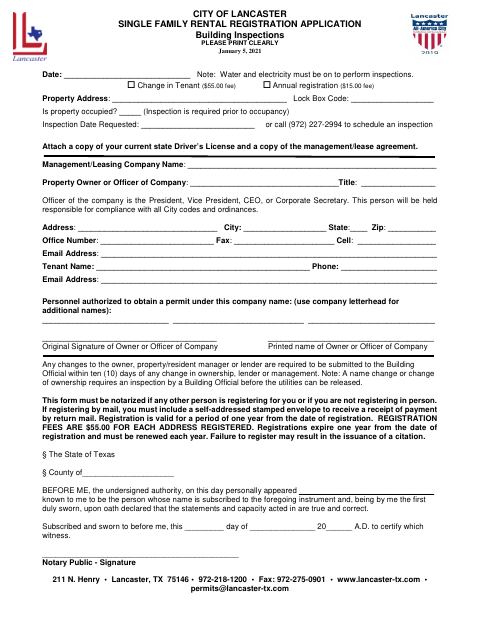
Single Family Rental Registration Application
This application registers a single-family rental property with Lancaster’s Building Inspections department and is completed by the property owner, company officer, or person registering on their behalf.
- licensed online notary
- ~15 min average
- Notarized PDF emailed
What you’ll need
- Government-issued photo ID
- Webcam-enabled device (laptop or phone)
- This form, ready to upload as a PDF
What this form is
Use this application to register a single-family rental property, request an inspection, and provide owner or management company, tenant, and authorized-permit personnel details. Lancaster requires notarization if someone else registers for you or if you are not registering in person. The form notes that registration lasts one year and must be renewed annually, and that failure to register may result in a citation.
Who needs it
Property owners, company officers, or representatives registering a single-family rental property in Lancaster need this form, with notarization required in specified circumstances.
Why it needs a notary
The form includes a jurat; the person whose name is subscribed to the application appears before the notary and swears that its statements are true and correct.
How to get this notarized
- 1
Download The Application
Get the Single Family Rental Registration Application from the City of Lancaster.
- 2
Fill Out The Form
Complete the property, owner or company, tenant, and authorized personnel fields. Attach the requested identification and management or lease agreement copies.
- 3
Book An Online Notary
Arrange a remote online notarization if someone else is registering for you or you are not registering in person.
- 4
Sign On Video
Sign in the notary’s presence and swear that the application statements are true and correct.
- 5
Submit To The City
Submit the completed application and attachments to Lancaster as directed by the city.
Preview the form
The blank PDF straight from Lancaster. Look it over, then upload your filled copy to start the notary session.

You’ll need ID and a webcam.
A licensed online notary will join you on video, verify your government-issued ID, witness your signature, and apply their seal. You’ll receive the notarized PDF by email when the session ends.
Frequently asked questions
- When does Lancaster require this form to be notarized?
- The form says notarization is required if another person is registering for you or if you are not registering in person.
- How do I complete the notary section?
- Complete the application and sign before the notary, who administers the oath and completes the jurat. The form states that the signer declares the application’s statements and capacity acted in are true and correct.
- Do I need to bring anything with my application?
- The form asks you to attach a copy of your current state driver’s license and a copy of the management or lease agreement. Confirm with the city if unsure.
- Can I use an online notary for this form?
- Texas has authorized remote online notarization since 2018. You can sign during a live video session with a commissioned online notary; check with Lancaster if you have questions about submission.