
Flower Mound, TX · Denton County
Contractor Registration
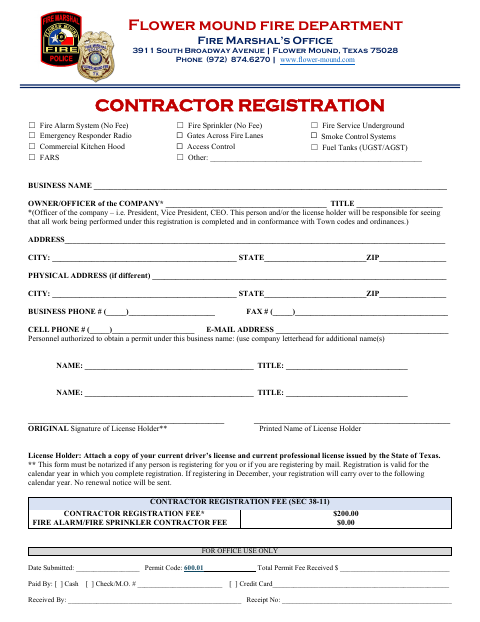
This form registers a company or license holder to perform listed fire and related work in Flower Mound and identifies company details, authorized permit applicants, and required license attachments.
- licensed online notary
- ~15 min average
- Notarized PDF emailed
What you’ll need
- Government-issued photo ID
- Webcam-enabled device (laptop or phone)
- This form, ready to upload as a PDF
What this form is
The Flower Mound Fire Marshal’s Office uses this form to register contractors for listed work, including fire alarms, fire sprinklers, fire service underground, and commercial kitchen hoods. The form collects business and owner or officer information, identifies personnel authorized to obtain permits, and requests copies of the license holder’s current driver’s license and Texas professional license. The form states that notarization is required when another person registers for the license holder or when registration is submitted by mail, email, or fax.
Who needs it
Companies or license holders seeking registration for listed fire and related work in Flower Mound must complete the business, responsible-person, and authorized-permit-personnel sections.
Why it needs a notary
The form includes a sworn jurat stating the registrant appeared, was sworn, and subscribed before the notary; the person registering signs before the notary when notarization is required.
How to get this notarized
- 1
Download The Form
Download the Contractor Registration form from the Flower Mound Fire Marshal’s Office.
- 2
Fill In The Form
Enter the business, owner or officer, contact, and authorized permit personnel details; attach the requested current licenses.
- 3
Book An Online Notary
If the form’s notarization conditions apply, book a commissioned online notary before signing.
- 4
Sign On Video
Appear by video, sign as directed, and complete the sworn jurat with the notary.
- 5
Submit To The City
Send the completed registration and attachments to the Flower Mound Fire Marshal’s Office using an accepted submission method.
Preview the form
The blank PDF straight from Flower Mound. Look it over, then upload your filled copy to start the notary session.

You’ll need ID and a webcam.
A licensed online notary will join you on video, verify your government-issued ID, witness your signature, and apply their seal. You’ll receive the notarized PDF by email when the session ends.
Frequently asked questions
- When does this contractor registration form need notarization?
- The form says notarization is required if someone other than the license holder registers for them, or if registration is submitted by mail, email, or fax.
- How do I complete the contractor registration?
- Fill in the business and license holder details, list authorized permit applicants, attach the requested current licenses, and arrange notarization if the form requires it. Submit the completed form to the Fire Marshal’s Office.
- Do I need to sign this form in front of a notary?
- If the form’s notarization conditions apply, the person registering must sign before a commissioned online notary, who completes the sworn jurat.
- Can I use an online notary for this form?
- Texas has authorized remote online notarization since 2018 under Government Code Chapter 406, Subchapter C. Texas recognizes acknowledgments taken by notaries of other states under CPRC §121.001; confirm with the city if unsure.
Other forms in Flower Mound
Contractor Registration in other Texas cities
Each city publishes its own version of this form. Pick the city where you’re filing.