
Midlothian, TX · Ellis County
Automated Payment Authorization Form
Customers use this form to authorize automatic monthly deductions from a checking or savings account for their City of Midlothian water, sewer, garbage, or recycling utility bill.
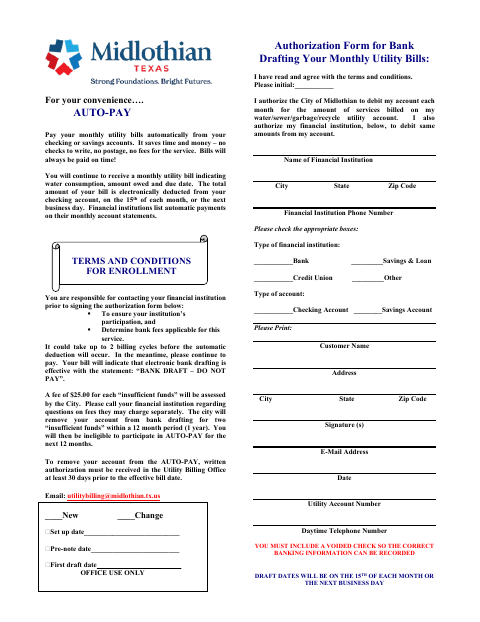
What this form is
This form authorizes the City of Midlothian and the customer's financial institution to debit the monthly amount due for utility services. It asks for customer and utility account details, bank and account information, and a signature and date. The form says to include a voided check; automatic deductions occur on the 15th or the next business day, and may take up to two billing cycles to begin.
Who needs it
A City of Midlothian utility customer who wants to pay monthly water, sewer, garbage, or recycling bills through automatic bank drafting needs this form.
How to submit it
Submit it to the city department named on the form; check the city website for current contact details.
About notarization
This form is signed and dated without a notary; include a voided check so the city can record the correct banking information.
How to submit this form
- 1
Download The Form
Download the Automated Payment Authorization Form.
- 2
Complete The Form
Enter your customer and utility account details, financial institution and account information, then sign and date the authorization.
- 3
Gather The Attachment
Include a voided check so the correct banking information can be recorded.
- 4
Submit To The City
Submit the form to the city department named on it; check the city website for current contact details.
Frequently asked questions
- What does the Automated Payment Authorization Form authorize?
- It authorizes monthly deductions from your checking or savings account for the amount due on your City of Midlothian water, sewer, garbage, or recycling utility bill.
- What do I need to include with the form?
- Include a voided check so the correct banking information can be recorded. The form also asks for customer, utility account, financial institution, and account details.
- Do I need a notary for the Automated Payment Authorization Form?
- No. The form is signed and dated without a notary; include a voided check with it.
- How do I submit the Automated Payment Authorization Form?
- Submit it to the city department named on the form; check the city website for current contact details.
Need something notarized?
This Automated Payment Authorization Form doesn’t need a notary — but Texas residents can notarize other documents online with a commissioned online notary.