
Waco, TX · McLennan County
Sign Permit Signature Page
This signature page records applicant and owner information and agreement to sign permit requirements for people seeking approval to install signs.
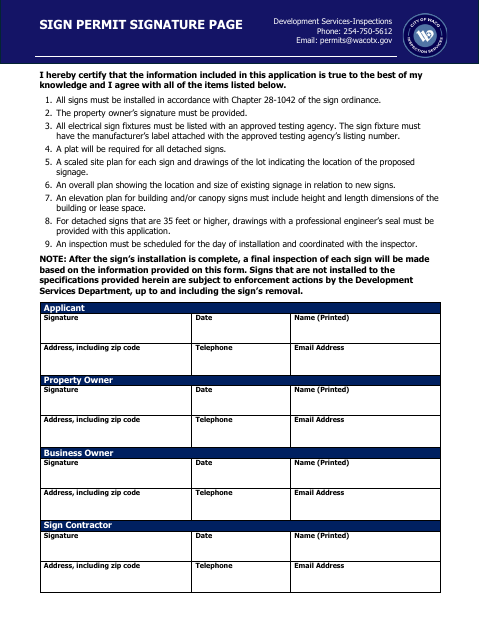
What this form is
This page accompanies a sign permit application and records the applicant’s certification and agreement to the listed requirements. It asks for contact information and signatures from the applicant, property owner, business owner, and sign contractor, along with the date. The page also lists supporting plans and documents required for different sign types, and states that an inspection must be scheduled for the installation day.
Who needs it
Applicants seeking sign permits should complete this page, with the property owner and other listed parties providing their signatures and contact information.
How to submit it
Submit it to the city department named on the form; check the city website for current contact details.
About notarization
This document is signed and dated without a notary; it lists supporting plans and documents but does not say any attachment or related step must be notarized or sworn.
How to submit this form
- 1
Download The Page
Download the Sign Permit Signature Page PDF.
- 2
Complete The Form
Enter the requested contact information and have the applicant, property owner, business owner, and sign contractor sign and date their sections.
- 3
Gather Supporting Documents
Gather the plans and documents listed on the form that apply to the proposed signs.
- 4
Submit To The City
Submit the page to the city department named on the form; check the city website for current contact details.
Frequently asked questions
- What is the Sign Permit Signature Page for?
- It records the applicant’s certification and agreement to sign requirements, and provides contact information and signature lines for the applicant, property owner, business owner, and sign contractor.
- Who needs to sign the page?
- The form includes signature and date lines for the applicant, property owner, business owner, and sign contractor. It specifically states that the property owner’s signature must be provided.
- Do I need a notary for the Sign Permit Signature Page?
- No. The document has signature and date lines but no notary block. It lists supporting plans and documents, but does not say any attachment or related step must be notarized or sworn.
- How do I submit the Sign Permit Signature Page?
- Submit it to the city department named on the form; check the city website for current contact details.
Need something notarized?
This Sign Permit Signature Page doesn’t need a notary — but Texas residents can notarize other documents online with a commissioned online notary.