
Mineral Wells, TX · Palo Pinto County
Special Event Application
This six-page application gathers event, site, route, traffic, and organization details from people or organizations seeking city review for a community event, road closure, or parade.
- licensed online notary
- ~15 min average
- Notarized PDF emailed
What you’ll need
- Government-issued photo ID
- Webcam-enabled device (laptop or phone)
- This form, ready to upload as a PDF
What this form is
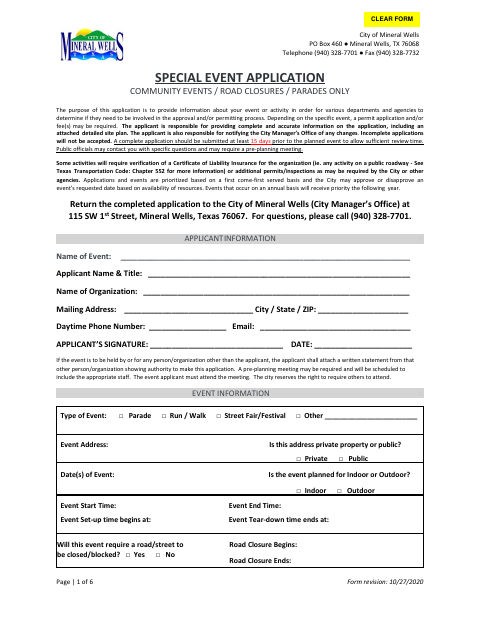
Use this application to describe your event, provide a detailed site plan, explain any route or traffic impacts, and complete the waiver and hold harmless agreement. The City of Mineral Wells asks applicants to submit a complete application at least 15 days before the event; it states that all applications must be signed and notarized. City review may involve other departments, and approval or additional permits, fees, or insurance may be required.
Who needs it
An applicant seeking city review for a community event, road closure, or parade in Mineral Wells must complete the application and provide the required event and site details.
Why it needs a notary
The form includes a sworn statement and a jurat beginning “Signed and sworn to before me”; the applicant signs the statement before a commissioned online notary.
How to get this notarized
- 1
Download the Application
Get the Special Event Application from the City of Mineral Wells.
- 2
Fill Out the Form
Provide applicant and event details, attach the required site plan, and include a route and traffic plan when applicable.
- 3
Book an Online Notary
Schedule a video session with a commissioned online notary for the form’s sworn statement.
- 4
Sign on Video
Sign the sworn statement during the online notary session and complete the notarization.
- 5
Submit to the City
Deliver the completed application and attachments to the City Manager’s Office as directed by the form.
Preview the form
The blank PDF straight from Mineral Wells. Look it over, then upload your filled copy to start the notary session.

You’ll need ID and a webcam.
A licensed online notary will join you on video, verify your government-issued ID, witness your signature, and apply their seal. You’ll receive the notarized PDF by email when the session ends.
Frequently asked questions
- How do I get the Special Event Application notarized online?
- Complete the application, then book a session with a commissioned online notary. Sign the sworn statement during the video session and follow the city’s instructions for submitting the completed application.
- Do I need to sign the application in front of a notary?
- Yes. The form states that all applications must be signed and notarized and includes a statement to be signed before a notary.
- Can I use an online notary for this Texas city form?
- Texas has authorized remote online notarization since 2018 under Government Code Chapter 406, Subchapter C. The form does not specify an online notarization method; confirm with the city if unsure.
- When should I submit the application?
- The form says a complete application should be submitted at least 15 days before the planned event to allow sufficient review time. Incomplete applications will not be accepted.
Special Event Application in other Texas cities
Each city publishes its own version of this form. Pick the city where you’re filing.