
Grapevine, TX · Tarrant County
Planned Development Overlay Application and Site Plan Set Checklist
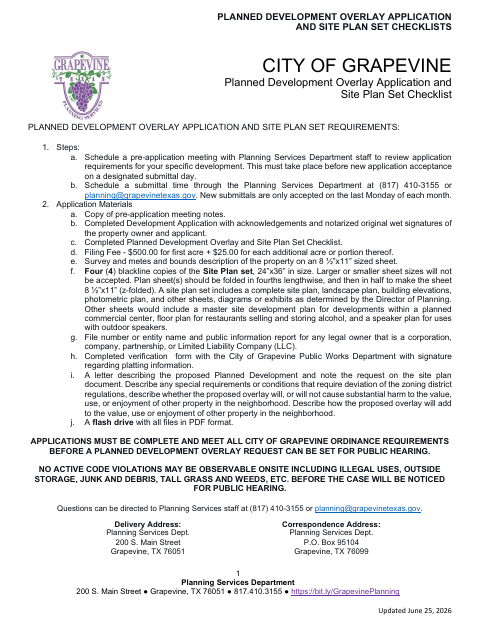
This application and checklist package is for property owners and applicants requesting a planned development overlay in Grapevine and submitting the required site plan materials.
- licensed online notary
- ~15 min average
- Notarized PDF emailed
What you’ll need
- Government-issued photo ID
- Webcam-enabled device (laptop or phone)
- This form, ready to upload as a PDF
What this form is
The package collects property and project information, owner and applicant certifications, and checklists for required site plans, landscaping, building elevations, and photometric plans. Grapevine requires a pre-application meeting before submittal, and accepts new applications on the last Monday of each month by scheduled appointment. The application must be complete and meet city requirements before the request can be set for a public hearing.
Who needs it
Property owners and designated project representatives seeking a planned development overlay in Grapevine need this application and its supporting checklists.
How to get this notarized
- 1
Download The Application
Download the planned development overlay application and site plan set checklist from the City of Grapevine.
- 2
Complete The Form
Fill in the property and project information, select representation, and prepare the required application materials and checklists.
- 3
Book An Online Notary
Schedule a commissioned online notary session for the property owner and applicant sworn statements.
- 4
- 5
Submit To The City
Schedule a submittal time with Planning Services and deliver the complete application materials to the city.
Preview the form
The blank PDF straight from Grapevine. Look it over, then upload your filled copy to start the notary session.

You’ll need ID and a webcam.
A licensed online notary will join you on video, verify your government-issued ID, witness your signature, and apply their seal. You’ll receive the notarized PDF by email when the session ends.
Frequently asked questions
- How do I notarize this planned development overlay application online?
- Complete the application, then book a commissioned online notary. The property owner and applicant must each take the oath and sign their respective jurat before the notary during the online session.
- Do I need to notarize both signature blocks?
- The form provides separate sworn statements and jurat blocks for the property owner and applicant. Each person signing one of these statements must appear before a notary for that oath.
- Can I use an online notary for this form?
- Texas has authorized remote online notarization since 2018. A commissioned online notary can notarize the sworn statements remotely; confirm with the city if unsure whether it will accept the notarized application.
- What else must I submit with the application?
- The checklist calls for items including pre-application meeting notes, a completed checklist, filing fee, property survey and metes and bounds description, site plan set, and a flash drive with PDF files. Review the full form for details.
Other forms in Grapevine
Board of Zoning Adjustment and Plot Plan Application
Grapevine
Ice Cream Vendor Permit Application and Regulations
Grapevine
Right-of-Way Annual Registration Form
Grapevine
Site Plan Application and Site Plan Set Checklists
Grapevine
Solicitor Permit Application and Regulations
Grapevine
Special Use Permit Application and Checklist
Grapevine