
Department of Planning and Natural Resources, VI · St. Thomas
Vessel Ownership Affidavit
This affidavit records vessel and owner details and is submitted by applicants claiming ownership to the Department of Planning and Natural Resources when requesting a Certificate of Registration.
- licensed online notary
- ~15 min average
- Notarized PDF emailed
What you’ll need
- Government-issued photo ID
- Webcam-enabled device (laptop or phone)
- This form, ready to upload as a PDF
What this form is
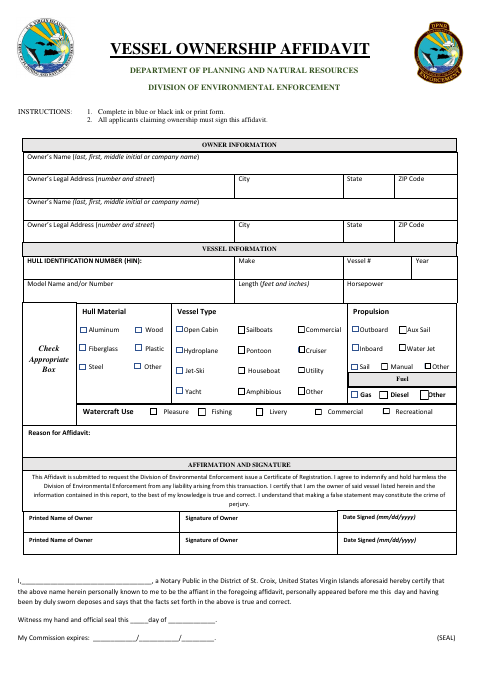
The Department of Planning and Natural Resources’ Division of Environmental Enforcement uses this affidavit to support a request for a Certificate of Registration. Applicants provide owner and vessel information, state why they are submitting the affidavit, and affirm that the information is true and correct. The form also includes an indemnity statement and warns that a false statement may constitute perjury. All applicants claiming ownership must sign.
Who needs it
Applicants claiming ownership of a vessel should complete this affidavit when requesting a Certificate of Registration from the Division of Environmental Enforcement.
How to get this notarized
- 1
Download The Affidavit
Get the Vessel Ownership Affidavit from the Department of Planning and Natural Resources.
- 2
Complete The Form
Fill in the owner and vessel information, select applicable details, and provide the reason for the affidavit.
- 3
Book An Online Notary
Schedule a session with a commissioned online notary and have identification ready.
- 4
Sign During The Video Session
Each applicant claiming ownership signs as directed while appearing before the notary.
- 5
Submit The Affidavit
Submit the notarized form to the Division of Environmental Enforcement with your Certificate of Registration request.
Preview the form
The blank PDF straight from Department of Planning and Natural Resources. Look it over, then upload your filled copy to start the notary session.

You’ll need ID and a webcam.
A licensed online notary will join you on video, verify your government-issued ID, witness your signature, and apply their seal. You’ll receive the notarized PDF by email when the session ends.
Frequently asked questions
- How do I complete the Vessel Ownership Affidavit?
- Enter the owner and vessel details, select the applicable options, state the reason for the affidavit, and have every applicant claiming ownership sign before the notary.
- Do I need to sign the affidavit in front of a notary?
- Yes. The form has a jurat stating that the affiant appeared and was sworn. Sign only when instructed during the notarization.
- Can I use an online notary for this form?
- A commissioned online notary may perform a notarization outside the territory, but acceptance of remote notarization is not confirmed for this form. Confirm with the receiving agency or the Recorder of Deeds if unsure.
- Why does the notary block mention the District of St. Croix?
- The supplied form’s notary block names the District of St. Croix, although this request concerns St. Thomas. Check with the Division of Environmental Enforcement before submitting if you are unsure which version to use.
Other forms in Department of Planning and Natural Resources
Boat Bill Of Sale
Department of Planning and Natural Resources
Major Development Permit Application
Department of Planning and Natural Resources
Major Water Permit Application
Department of Planning and Natural Resources
Minor Land Permit Application
Department of Planning and Natural Resources
Minor Water Permit Application
Department of Planning and Natural Resources
Vessel Bill of Sale
Department of Planning and Natural Resources