
Office of the Lieutenant Governor, VI · St. Thomas
Affidavit of Translation
This affidavit lets a translator or verifier attest to fluency in English and another language and certify that an attached document’s translation is true, complete, and accurate.
- licensed online notary
- ~15 min average
- Notarized PDF emailed
What you’ll need
- Government-issued photo ID
- Webcam-enabled device (laptop or phone)
- This form, ready to upload as a PDF
What this form is
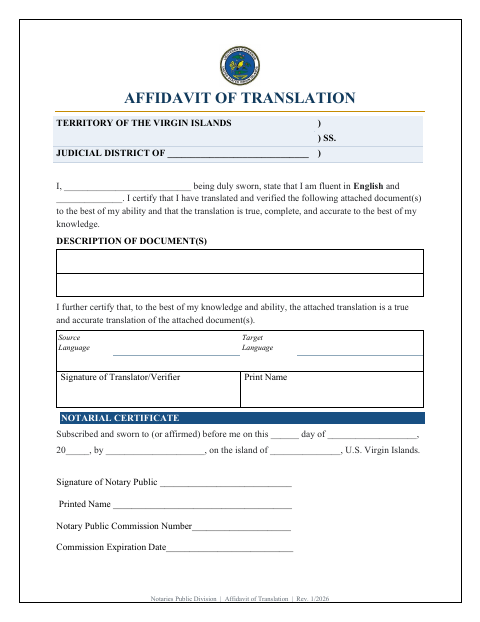
The Affidavit of Translation is for a translator or verifier who has translated attached document(s) and needs to state their language fluency and certify the translation’s accuracy. The form includes spaces to describe the documents, identify the source and target languages, and sign as translator or verifier. The signer swears or affirms the statement before a notary public, who completes the notarial certificate.
Who needs it
A translator or verifier who must certify the accuracy of an attached translation and swear or affirm that statement before a notary public needs this form.
Why it needs a notary
The form carries a subscribed-and-sworn-to-or-affirmed jurat; the translator or verifier signs and swears or affirms before the notary.
How to get this notarized
- 1
Download The Form
Get the Affidavit of Translation from the Office of the Lieutenant Governor.
- 2
Fill In The Form
Describe the document(s), enter the source and target languages, and complete the translator or verifier information.
- 3
Book An Online Notary
Arrange a session with a commissioned online notary and check acceptance with the receiving agency if unsure.
- 4
Sign On Video
Swear or affirm the affidavit and sign before the notary during the online session.
- 5
Submit The Form
Submit the completed, notarized affidavit and attached translation to the receiving agency.
Preview the form
The blank PDF straight from Office of the Lieutenant Governor. Look it over, then upload your filled copy to start the notary session.

You’ll need ID and a webcam.
A licensed online notary will join you on video, verify your government-issued ID, witness your signature, and apply their seal. You’ll receive the notarized PDF by email when the session ends.
Frequently asked questions
- How do I complete the Affidavit of Translation?
- Describe the attached document(s), enter the source and target languages, and provide your translator or verifier details. Sign and swear or affirm before the notary, who completes the certificate.
- Do I need to sign the affidavit in front of a notary?
- Yes. The form’s certificate states that the signer subscribed and swore to or affirmed the affidavit before a notary public.
- Can I use an online notary for this affidavit?
- The form requires a notarial act but does not specify online notarization. Acceptance of a commissioned online notary’s act is not confirmed for this form; confirm with the receiving agency or the Recorder of Deeds if unsure.
- Who signs the Affidavit of Translation?
- The translator or verifier signs the certification about language fluency and the accuracy of the attached translation, then swears or affirms before the notary.
Other forms in Office of the Lieutenant Governor
Affidavit of Lost Instrument
Office of the Lieutenant Governor
Affidavit of Lost Instrument (Power of Attorney)
Office of the Lieutenant Governor
Affidavit Payment of Certain Debts Without Administration
Office of the Lieutenant Governor
Appointment of Insurance Producer
Office of the Lieutenant Governor
Appointment of Solicitor
Office of the Lieutenant Governor
Consent of Agent for Service of Process
Office of the Lieutenant Governor