
Office of the Lieutenant Governor, VI · St. Thomas
Appointment of Solicitor
This form lets an insurance producer appoint a solicitor to solicit and accept insurance applications in the U.S. Virgin Islands, with the solicitor signing an agreement before a notary.
- licensed online notary
- ~15 min average
- Notarized PDF emailed
What you’ll need
- Government-issued photo ID
- Webcam-enabled device (laptop or phone)
- This form, ready to upload as a PDF
What this form is
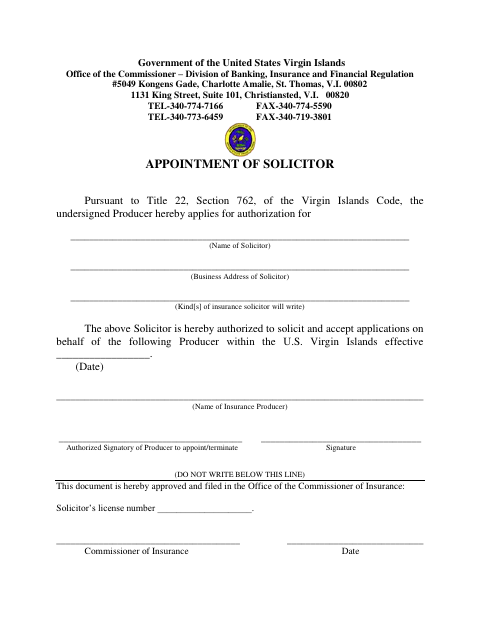
An insurance producer uses this two-part form to identify the solicitor, business address, types of insurance, and producer represented. The solicitor also agrees to serve and acknowledges limits on the authority to write insurance or bind an insurer. The form is for filing with the Office of the Commissioner of Insurance, Division of Banking, Insurance and Financial Regulation, for review and recording of the solicitor’s license number.
Who needs it
An insurance producer appointing a solicitor, and the solicitor agreeing to serve, use this form for the territorial insurance regulator.
Why it needs a notary
The solicitor signs the agreement and swears to it in the form’s “Subscribed and sworn to before me” jurat before a notary public.
How to get this notarized
- 1
Download the Form
Get the Appointment of Solicitor form from the Office of the Lieutenant Governor.
- 2
Fill In the Details
Complete the producer, solicitor, business address, insurance types, and appointment information requested on the form.
- 3
Book an Online Notary
Arrange a session with a commissioned online notary and have identification ready.
- 4
Sign on Video
Sign and swear to the solicitor agreement during the notary’s video session; do not sign the jurat section in advance.
- 5
Submit the Form
Send the completed form to the Office of the Commissioner of Insurance as directed by the receiving agency.
Preview the form
The blank PDF straight from Office of the Lieutenant Governor. Look it over, then upload your filled copy to start the notary session.

You’ll need ID and a webcam.
A licensed online notary will join you on video, verify your government-issued ID, witness your signature, and apply their seal. You’ll receive the notarized PDF by email when the session ends.
Frequently asked questions
- What is the Appointment of Solicitor form for?
- It records an insurance producer’s appointment of a solicitor and the solicitor’s agreement to serve, including the solicitor’s sworn statement and signature.
- Do I need to sign this form before a notary?
- Yes. The solicitor signs the agreement under the “Subscribed and sworn to before me” jurat, which calls for signing and swearing before a notary public.
- How do I complete the solicitor agreement?
- Enter the requested producer and solicitor details, review the agreement, and leave the jurat for completion during notarization. The producer’s authorized signatory also signs the appointment section.
- Can I use an online notary for this form?
- A commissioned online notary may be an option, but acceptance of remote notarization for this filing is not confirmed. Confirm with the receiving agency or the Recorder of Deeds if unsure.
Other forms in Office of the Lieutenant Governor
Affidavit of Lost Instrument
Office of the Lieutenant Governor
Affidavit of Lost Instrument (Power of Attorney)
Office of the Lieutenant Governor
Affidavit of Translation
Office of the Lieutenant Governor
Affidavit Payment of Certain Debts Without Administration
Office of the Lieutenant Governor
Appointment of Insurance Producer
Office of the Lieutenant Governor
Consent of Agent for Service of Process
Office of the Lieutenant Governor