
Moab, UT · Grand County
Police Records Request Form
This form lets people request a Moab City Police Department record, describe the report they need, and state their relationship to the record if access is restricted.
- licensed online notary
- ~15 min average
- Notarized PDF emailed
What you’ll need
- Government-issued photo ID
- Webcam-enabled device (laptop or phone)
- This form, ready to upload as a PDF
What this form is
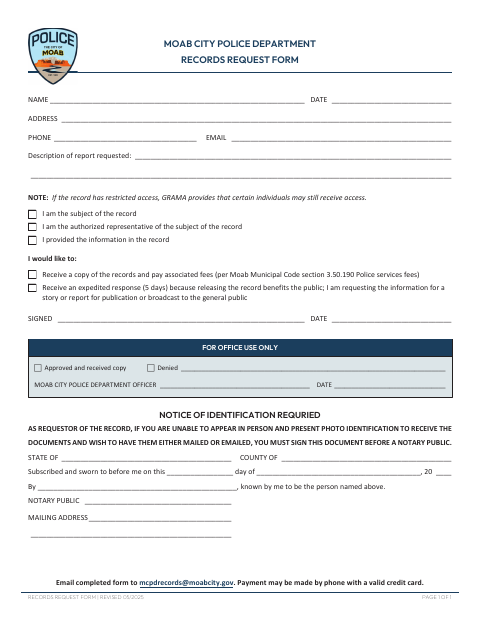
Use this form to request a Moab City Police Department record and describe the report you want. If access is restricted, the form lets you identify whether you are the subject, an authorized representative, or the person who provided the information. It also lets you request a copy and pay applicable fees, or ask for an expedited response on public-benefit grounds. The form requires notarization if you cannot appear in person with photo identification and want the documents mailed or emailed.
Who needs it
Anyone requesting a police record from the Moab City Police Department may use this form, with notarization required for certain mailed or emailed requests.
Why it needs a notary
The form carries a subscribed-and-sworn jurat, and the requester must sign before the notary if unable to appear with photo identification and seeking mail or email delivery.
How to get this notarized
- 1
Download the Form
Get the Moab City Police Department Records Request Form.
- 2
Fill Out the Request
Enter your contact details, describe the report, and select any applicable access or response options.
- 3
Book an Online Notary
If your delivery situation requires notarization, arrange a session with a commissioned online notary.
- 4
Sign on Video
Sign the form during the online session so the notary can complete the jurat.
- 5
Submit to the City
Email the completed form to the police department at [email protected].
Preview the form
The blank PDF straight from Moab. Look it over, then upload your filled copy to start the notary session.

You’ll need ID and a webcam.
A licensed online notary will join you on video, verify your government-issued ID, witness your signature, and apply their seal. You’ll receive the notarized PDF by email when the session ends.
Frequently asked questions
- When does this police records request need notarization?
- The form says you must sign before a notary if you cannot appear in person and present photo identification, and want the documents mailed or emailed.
- How do I submit the completed request?
- Email the completed form to [email protected]. The form says payment may be made by phone with a valid credit card.
- Do I need to sign in front of a notary?
- Only in the situation described on the form: when you cannot appear in person with photo identification and want the documents mailed or emailed.
- Can I complete the notarization online?
- Utah allows a commissioned online notary with remote-notary certification to perform remote notarizations. Contact the police department if you are unsure whether it accepts an online-notarized form.
- What if I am unsure where to ask about a recording issue?
- This form is a police records request, not a recording submission. For a separate recording question, confirm with the city or county recorder if unsure.