
Uintah, UT · Weber County
Conditional Use Permit Application – Commercial Property
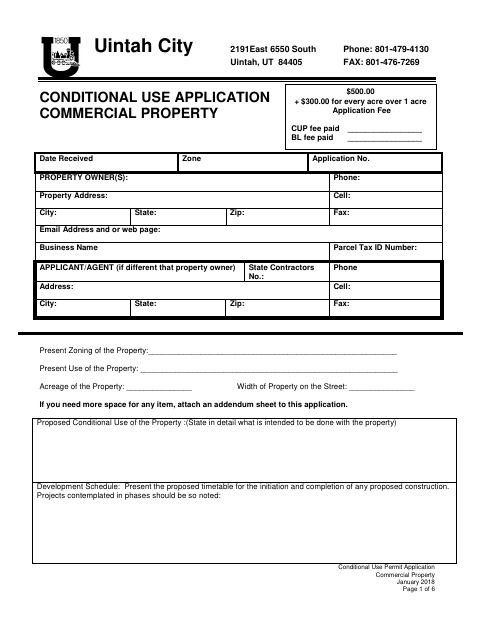
This six-page application lets commercial property owners or their authorized agents request a conditional use permit from Uintah City and provide project, site, and impact details.
- licensed online notary
- ~15 min average
- Notarized PDF emailed
What you’ll need
- Government-issued photo ID
- Webcam-enabled device (laptop or phone)
- This form, ready to upload as a PDF
What this form is
Use this application to describe the proposed commercial use, property, development schedule, operations, parking, and potential impacts. The applicant affidavit and agent authorization appear near the end; the remaining sections are reserved for the Planning Commission. Submit the completed application and any plans or exhibits to the city for review.
Who needs it
Commercial property owners seeking a conditional use permit in Uintah City, or agents applying for an owner who completes the form’s authorization.
Why it needs a notary
The applicant affidavit says the signer is duly sworn, but the form shows no separate jurat or acknowledgment block; the property owner signing should appear before a notary.
How to get this notarized
- 1
Download The Application
Download Uintah City’s six-page commercial conditional use permit application.
- 2
Complete The Application
Enter the property and applicant details, describe the proposed use, and answer the site-impact questions. Attach additional sheets or exhibits as needed.
- 3
Book An Online Notary
If the city requires notarization, book a session with a commissioned online notary for the applicant affidavit.
- 4
Sign On Video
Follow the notary’s instructions and sign the affidavit during the online video session.
- 5
Submit To The City
Submit the completed application and supporting materials to Uintah City for review.
Preview the form
The blank PDF straight from Uintah. Look it over, then upload your filled copy to start the notary session.

You’ll need ID and a webcam.
A licensed online notary will join you on video, verify your government-issued ID, witness your signature, and apply their seal. You’ll receive the notarized PDF by email when the session ends.
Frequently asked questions
- How do I complete the commercial conditional use application?
- Provide the property, applicant, proposed use, development schedule, operations, and site-impact details. Attach additional sheets, plans, or exhibits if needed, then sign the applicant affidavit.
- Do I need to sign the applicant affidavit before a notary?
- The affidavit says the applicant is duly sworn, although the form does not show a separate notary block. Ask Uintah City whether it requires notarization before signing.
- Can I use an online notary for the affidavit?
- Utah authorizes a commissioned online notary to perform remote notarizations after obtaining the required remote notary certification. Confirm with Uintah City whether it accepts the notarized affidavit.
- Where do I submit the completed application?
- Submit the completed application and supporting materials to Uintah City for review. Confirm with the city or county recorder if unsure which office should receive a notarized document.