
Uintah, UT · Weber County
Conditional Use Permit Application – Home Based Business Short Term Rental
Uintah City property owners or their authorized agents use this application to request a conditional use permit for a home-based business operating as a short-term rental.
- licensed online notary
- ~15 min average
- Notarized PDF emailed
What you’ll need
- Government-issued photo ID
- Webcam-enabled device (laptop or phone)
- This form, ready to upload as a PDF
What this form is
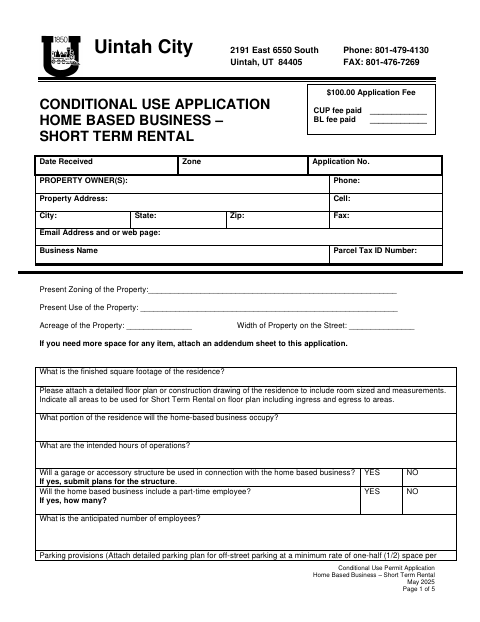
The application collects property, business, parking, safety, and neighborhood-impact details for the proposed short-term rental, and asks applicants to attach a floor plan and parking plan. Property owners submit it to Uintah City to seek conditional use approval; the Planning Commission completes the remaining sections and may recommend conditions.
Who needs it
Property owners seeking approval for a home-based short-term rental in Uintah City, or agents authorized by those owners, need to complete and submit this application.
Why it needs a notary
The form includes a sworn Applicant’s Affidavit with state-and-county venue; each property owner signing it must appear before a notary to swear to its statements.
How to get this notarized
- 1
Download The Application
Get Uintah City’s Conditional Use Permit Application for a Home Based Business – Short Term Rental.
- 2
Fill Out The Application
Provide the property and business details, answer the application questions, and prepare the requested floor plan and parking plan.
- 3
Book An Online Notary
Schedule a session with a commissioned online notary for the property owner’s sworn Applicant’s Affidavit.
- 4
- 5
Submit To The City
Send the completed application and required attachments to Uintah City.
Preview the form
The blank PDF straight from Uintah. Look it over, then upload your filled copy to start the notary session.

You’ll need ID and a webcam.
A licensed online notary will join you on video, verify your government-issued ID, witness your signature, and apply their seal. You’ll receive the notarized PDF by email when the session ends.
Frequently asked questions
- How do I apply for a short-term rental conditional use permit?
- Complete the application, attach the requested floor plan and parking plan, have the property owner sign the sworn affidavit before a notary, and submit the materials to Uintah City.
- Do I need to attach plans to this application?
- Yes. The form requests a detailed floor plan showing rental areas and access, plus a detailed off-street parking plan.
- Can I sign the Applicant’s Affidavit online?
- Utah authorizes a commissioned online notary to perform remote notarizations subject to applicable requirements. Arrange to sign the sworn affidavit during an online notary session.
- Where should I submit the completed form?
- Submit the completed application and attachments to Uintah City. If you are unsure about a recording or filing question, confirm with the city or county recorder if unsure.