
Blackstone, VA · Nottoway County
Seller's Worksheet for Reporting Lodging Tax
Lodging sellers use this worksheet to report monthly gross revenue, calculate lodging tax and any applicable penalty or interest, and return it with payment.
What this form is
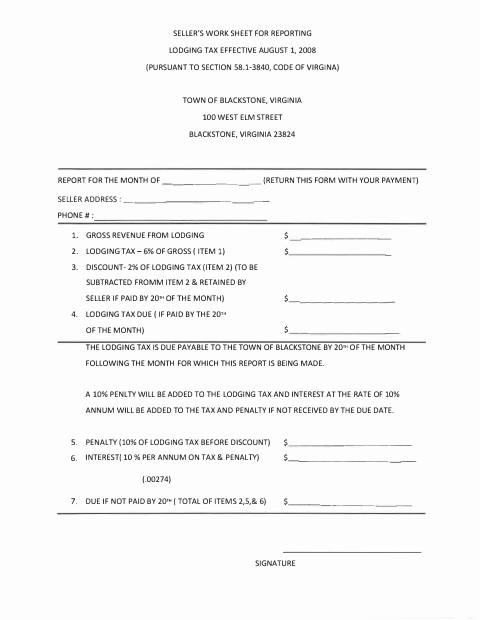
This worksheet lets lodging sellers report a month’s gross lodging revenue and calculate the lodging tax due to the Town of Blackstone. It asks for the reporting month, seller’s address and phone number, revenue and tax amounts, and the seller’s signature. The form states that it should be returned with payment and gives the payment due date and late-payment calculations.
Who needs it
A lodging seller reporting monthly lodging revenue and tax to the Town of Blackstone needs this worksheet.
How to submit it
Return the completed form with payment to the Town of Blackstone at 100 West Elm Street, Blackstone, Virginia 23824.
About notarization
This worksheet is signed without a notary; the form asks the seller to sign and does not identify any notarized attachment or sworn step.
How to submit this form
- 1
Download The Worksheet
Download the Seller's Worksheet for Reporting Lodging Tax.
- 2
Complete The Worksheet
Enter the reporting month, seller contact details, lodging revenue, and the requested tax calculations, then sign.
- 3
Return It With Payment
Return the completed worksheet with payment to the Town of Blackstone at 100 West Elm Street, Blackstone, Virginia 23824.
Frequently asked questions
- What does the lodging tax worksheet report?
- It reports monthly gross lodging revenue and calculates lodging tax due, including the stated discount when paid by the 20th and penalty and interest if not paid by the due date.
- Who should complete this worksheet?
- The form is for lodging sellers reporting to the Town of Blackstone. It requests the reporting month, seller’s address and phone number, revenue and tax calculations, and a signature.
- Do I need a notary for the lodging tax worksheet?
- No. This worksheet is signed without a notary, and it does not identify any notarized attachment or sworn step.
- How do I submit the lodging tax worksheet?
- Return the completed worksheet with payment to the Town of Blackstone at 100 West Elm Street, Blackstone, Virginia 23824.
Need something notarized?
This Seller's Worksheet for Reporting Lodging Tax doesn’t need a notary — but if you have another Blackstone form that does, a commissioned online notary can help.