
Richmond, VA · City of Richmond
OCRA Application and Subscriber Agreement
This five-page application and agreement requests Officer of the Court Remote Access to Richmond Circuit Court case documents, for individual attorneys and eligible supervised staff seeking new or renewed access.
- licensed online notary
- ~15 min average
- Notarized PDF emailed
What you’ll need
- Government-issued photo ID
- Webcam-enabled device (laptop or phone)
- This form, ready to upload as a PDF
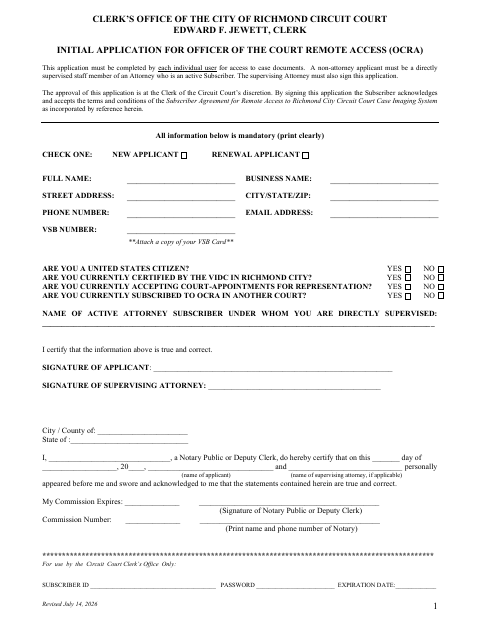
What this form is
Use this form to apply for or renew an individual subscription to the Richmond Circuit Court’s OCRA case-imaging system. Applicants provide personal and business details, answer eligibility questions, certify their information, and accept the subscriber agreement; non-attorney applicants must be directly supervised by an active attorney subscriber, who also signs. The clerk decides whether to approve the application, and applicants mail it with payment and a bar card copy if applicable.
Who needs it
Individual attorneys and eligible staff directly supervised by an active attorney subscriber use this form to request or renew access to Richmond Circuit Court case documents.
Why it needs a notary
The form has a sworn-and-acknowledged jurat: the applicant and supervising attorney, if applicable, appear before the notary and swear and acknowledge their statements are true and correct.
How to get this notarized
- 1
Download the Form
Get the OCRA Application and Subscriber Agreement from the City of Richmond Clerk’s Office.
- 2
Complete the Application
Fill in all mandatory information, answer the eligibility questions, and attach a copy of your bar card if applicable.
- 3
Book an Online Notary
Schedule a session with a commissioned online notary for the form’s sworn-and-acknowledged jurat.
- 4
Sign on Video
Appear by video and sign before the notary; your supervising attorney must also sign if applicable.
- 5
Mail to the Clerk
Mail the completed application, payment, and bar card copy if applicable to the address printed on the form.
Preview the form
The blank PDF straight from Richmond. Look it over, then upload your filled copy to start the notary session.

You’ll need ID and a webcam.
A licensed online notary will join you on video, verify your government-issued ID, witness your signature, and apply their seal. You’ll receive the notarized PDF by email when the session ends.
Frequently asked questions
- How do I submit the OCRA application?
- Complete the application, sign before a notary, and mail it with payment and a copy of your bar card if applicable to the Clerk of the Circuit Court, Attn: OCRA Subscription, at the address shown on the form.
- Do I need my supervising attorney to sign?
- If you are a non-attorney applicant, the form says you must be directly supervised by an active subscriber attorney, and that supervising attorney must also sign the application.
- Can I sign this form with an online notary?
- Virginia is widely credited as the first state to authorize remote online notarization, effective July 1, 2012. A commissioned online notary can notarize your signature by video; confirm with the city, town, or county if unsure.
- What does the notary certify on this form?
- The notary certifies that the applicant and, if applicable, supervising attorney personally appeared and swore and acknowledged that the statements are true and correct.