
Richmond, VA · City of Richmond
Application for Secure Remote Access to Circuit Court Records
This application lets an individual request or renew inquiry-only online access to Richmond Circuit Court land records, judgments, and financing statements, subject to approval by the Clerk.
- licensed online notary
- ~15 min average
- Notarized PDF emailed
What you’ll need
- Government-issued photo ID
- Webcam-enabled device (laptop or phone)
- This form, ready to upload as a PDF
What this form is
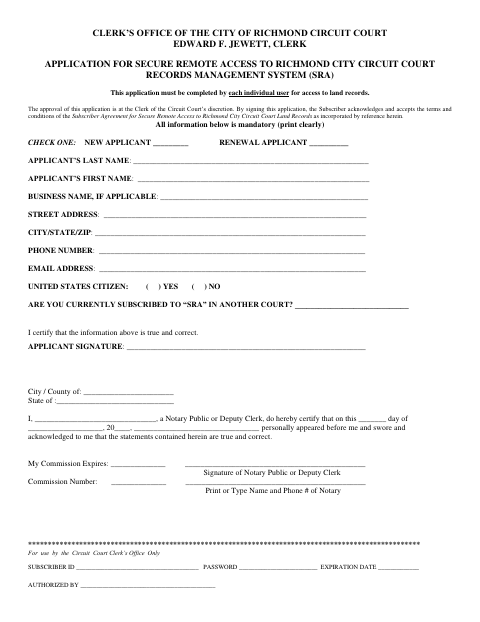
Each individual seeking access to the Richmond City Circuit Court records management system must complete the application, provide the required information, and accept the incorporated Subscriber Agreement. The Clerk’s approval is discretionary, and the form states that access is not issued until the application is approved. Applicants must return the signed, notarized application and applicable payment to the Circuit Court Clerk’s office.
Who needs it
An individual applying for or renewing a subscription to Richmond City Circuit Court’s online records system needs to complete this application.
Why it needs a notary
The form carries a sworn-and-acknowledged jurat block; the applicant must personally appear before a notary public or deputy clerk and swear the statements are true and correct.
How to get this notarized
- 1
Download The Application
Get the Secure Remote Access application from the City of Richmond.
- 2
Complete The Application
Fill in the required applicant information and indicate whether you are applying for a new subscription or renewal.
- 3
Book An Online Notary
Schedule a remote session with a commissioned online notary to notarize the application.
- 4
Sign On Video
Personally appear by video and swear that the statements in the application are true and correct.
- 5
Submit To The City
Return the signed, notarized application and applicable payment to the Richmond City Circuit Court Clerk’s office.
Preview the form
The blank PDF straight from Richmond. Look it over, then upload your filled copy to start the notary session.

You’ll need ID and a webcam.
A licensed online notary will join you on video, verify your government-issued ID, witness your signature, and apply their seal. You’ll receive the notarized PDF by email when the session ends.
Frequently asked questions
- How do I apply for secure remote access to Richmond Circuit Court records?
- Complete the application, sign it before a notary public or deputy clerk, and return it with the applicable payment to the Richmond City Circuit Court Clerk’s office.
- Do I need to sign this application in front of a notary?
- Yes. The application includes a block requiring you to personally appear before a notary public or deputy clerk and swear that your statements are true and correct.
- Can a commissioned online notary notarize this application?
- Virginia authorized remote online notarization effective July 1, 2012. A commissioned online notary can perform the notarial act remotely; confirm with the city, town, or county if unsure.
- Where do I send the completed application?
- The form directs applicants to return the signed and notarized application with payment to the Richmond City Circuit Court Clerk’s office at the John Marshall Courts Building.