
Colonial Beach, VA · Westmoreland County
Sign Permit Application
This six-page application requests Town of Colonial Beach approval to install or modify a sign and is filed by the property owner or applicant with the Department of Planning and Community Development.
- licensed online notary
- ~15 min average
- Notarized PDF emailed
What you’ll need
- Government-issued photo ID
- Webcam-enabled device (laptop or phone)
- This form, ready to upload as a PDF
What this form is
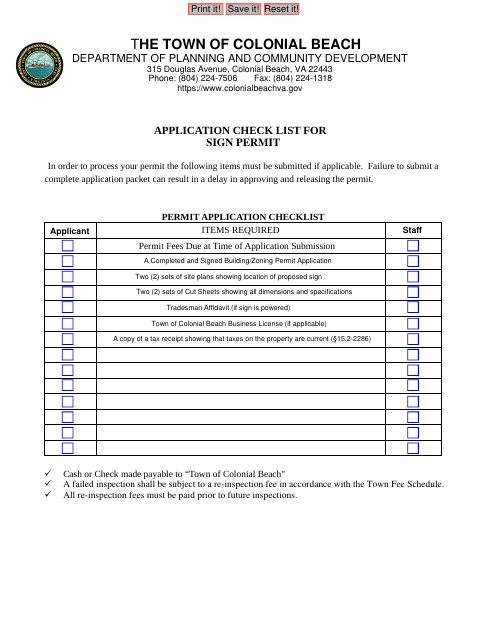
Use this application to provide property, applicant, sign, and contractor details for a proposed sign in Colonial Beach. The Town checklist also calls for applicable site plans, sign cut sheets, and other supporting documents; an incomplete packet can delay approval. If the owner is acting as contractor, the form includes an Owner’s Affidavit with a notary block. A Tradesman Affidavit is required before permit issuance when applicable.
Who needs it
Property owners or applicants seeking Town approval for a proposed sign should complete the application and submit the applicable plans, cut sheets, and supporting documents.
Why it needs a notary
The Owner’s Affidavit carries a signed-and-acknowledged notary block; the owner acting as contractor signs that affidavit before the notary.
How to get this notarized
- 1
Download the Application
Get the Town of Colonial Beach sign permit application and review its checklist and instructions.
- 2
Fill Out the Form
Complete the applicable applicant, property, sign, and contractor information, and gather the required plans and supporting materials.
- 3
Book an Online Notary
If completing the Owner’s Affidavit as an owner acting as contractor, book a commissioned online notary.
- 4
Sign on Video
Sign the Owner’s Affidavit during the online notary session and follow the notary’s instructions.
- 5
Submit to the Town
Submit the completed application, notarized affidavit if applicable, and required attachments to the Town’s Planning and Community Development Department.
Preview the form
The blank PDF straight from Colonial Beach. Look it over, then upload your filled copy to start the notary session.

You’ll need ID and a webcam.
A licensed online notary will join you on video, verify your government-issued ID, witness your signature, and apply their seal. You’ll receive the notarized PDF by email when the session ends.
Frequently asked questions
- How do I notarize the Owner’s Affidavit?
- If you are the owner acting as contractor, complete the affidavit and sign it before a commissioned online notary. Submit the notarized affidavit with your sign permit application.
- Do I need to notarize the entire sign permit application?
- The form’s notary block is part of the Owner’s Affidavit for an owner acting as contractor. The application does not identify its other sections as requiring notarization.
- Can I use an online notary for this form?
- Virginia is widely credited as the first U.S. state to authorize remote online notarization, effective July 1, 2012. Virginia Code §47.1-13.1 recognizes a notarial act performed in another state by a notary authorized there as presumed valid in Virginia.
- What supporting materials does the Town request?
- The checklist calls for two sets of site plans and sign cut sheets, plus applicable licenses, a tax receipt showing current property taxes, and other items listed on the form.
- Where do I submit the completed application?
- Submit the application packet to the Town of Colonial Beach Department of Planning and Community Development. Contact the Town at the address or phone number shown on the form; confirm with the city, town, or county if unsure.