
Bothell, WA · King County
Permit & Application Change Form
This form lets applicants request changes to information on an original Bothell permit or application, including ownership, contractor, contact person, or project name.
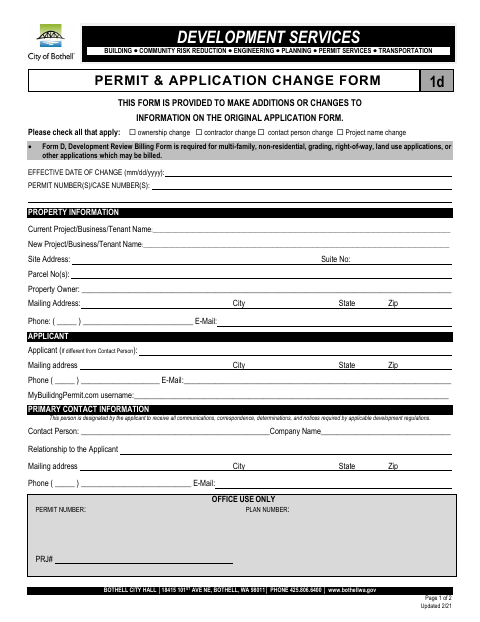
What this form is
Use this form to add or change information on an original application, identifying the effective date, permit or case numbers, property, applicant, and primary contact. It also collects architect, engineer, and contractor details and includes applicant acknowledgements and a signature. Form D, the Development Review Billing Form, is required for certain listed application types or other applications that may be billed.
Who needs it
Applicants seeking to change information on an original Bothell permit or application should complete this form and identify the requested change.
How to submit it
Submit it to the city department named on the form; check the city website for current contact details.
About notarization
This document is signed without a notary; the applicant signs and dates the form and declares that the information and any attachments or checklists are true, correct, and complete.
How to submit this form
- 1
Download The Form
Download the Permit & Application Change Form.
- 2
Complete The Form
Select the change type, provide the effective date and permit or case number, and complete the relevant project and contact details.
- 3
Gather Required Form
Include Form D if required for your application type or because the application may be billed.
- 4
Sign And Date
Sign and date the form and complete the applicable owner or agent selection.
- 5
Submit To The City
Submit the completed form to the city department named on it; check the city website for current contact details.
Frequently asked questions
- What changes can I request with this form?
- The form lists ownership, contractor, contact person, and project name changes. It is provided for additions or changes to information on an original application.
- Do I need a notary for the Permit & Application Change Form?
- No. The form does not require notarization; the applicant signs and dates it and declares that the information and any attachments or checklists are true, correct, and complete.
- How do I submit the Permit & Application Change Form?
- The form does not provide submission instructions. Submit it to the city department named on the form and check the city website for current contact details.
- Do I need to include another form?
- Form D, the Development Review Billing Form, is required for multi-family, non-residential, grading, right-of-way, and land use applications, and other applications that may be billed.
Need something notarized?
This Permit & Application Change Form doesn’t need a notary — but if you have another Bothell form that does, a commissioned online notary can help.