
Madison, WI · Dane County
Theater License Application
The Madison Theater License application collects business, licensed-premise, ownership, and operating details from an individual or business seeking a theater license or submitting its renewal to the City Clerk.
- licensed online notary
- ~15 min average
- Notarized PDF emailed
What you’ll need
- Government-issued photo ID
- Webcam-enabled device (laptop or phone)
- This form, ready to upload as a PDF
What this form is
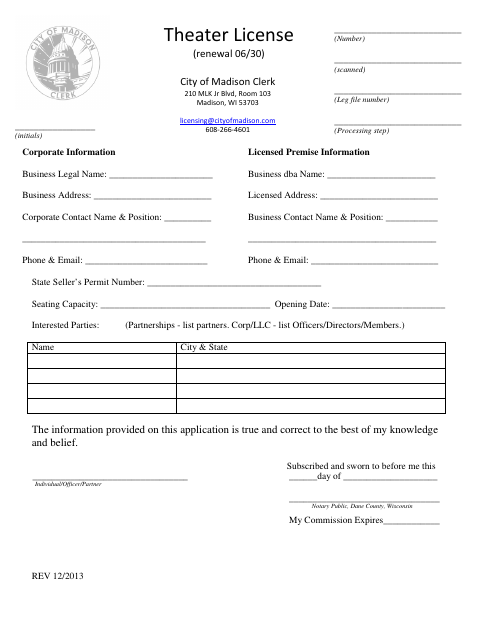
This application records the business’s legal and trade names, business and licensed addresses, contact information, seating capacity, opening date, seller’s permit number, and interested parties. An individual, officer, or partner attests that the information is true and correct. The form identifies the license as a renewal due June 30 and is addressed to the City of Madison Clerk’s licensing office.
Who needs it
An individual or business representative applying for or renewing a Madison theater license should complete the form with the requested business, premises, and interested-party details.
Why it needs a notary
The form has a subscribed-and-sworn jurat; the individual, officer, or partner making the application signs and swears to its truth before the notary.
How to get this notarized
- 1
Download The Application
Get the Theater License application from the City of Madison Clerk.
- 2
Fill In The Form
Enter the business, licensed-premise, contact, seating, opening-date, seller’s permit, and interested-party details.
- 3
Book An Online Notary
Arrange a session with a commissioned online notary before signing the jurat.
- 4
Sign On Video
Sign and swear to the application during the video session as directed by the notary.
- 5
Submit To The City
Send the completed application to the City of Madison Clerk’s licensing office.
Preview the form
The blank PDF straight from Madison. Look it over, then upload your filled copy to start the notary session.

You’ll need ID and a webcam.
A licensed online notary will join you on video, verify your government-issued ID, witness your signature, and apply their seal. You’ll receive the notarized PDF by email when the session ends.
Frequently asked questions
- How do I get the Madison Theater License application notarized online?
- Complete the application, then book with a commissioned online notary. Sign and swear to the information during the video session, following the notary’s instructions.
- Do I need to swear to the information before a notary?
- Yes. The form includes a subscribed-and-sworn jurat, where the individual, officer, or partner signs and swears that the application information is true and correct.
- Can I use online notarization for this Wisconsin form?
- Wisconsin law authorizes remote online notarization by a commissioned online notary under Wis. Stat. §140.145. Confirm with the city or village if unsure whether it will accept an online-notarized application.
- Where do I submit the completed application?
- The form is addressed to the City of Madison Clerk’s licensing office at 210 MLK Jr Blvd, Room 103, Madison, WI 53703. It also lists an email address and phone number for licensing.
Theater License Application in other Wisconsin cities
Each city publishes its own version of this form. Pick the city where you’re filing.