
Mesa, AZ · Maricopa County
General Disclosure and Representation Authorization Form
This form lets a Mesa licensee authorize representatives to receive confidential licensing information and, if selected, act on the licensee’s behalf for specified licensing matters and years.
- licensed online notary
- ~15 min average
- Notarized PDF emailed
What you’ll need
- Government-issued photo ID
- Webcam-enabled device (laptop or phone)
- This form, ready to upload as a PDF
What this form is
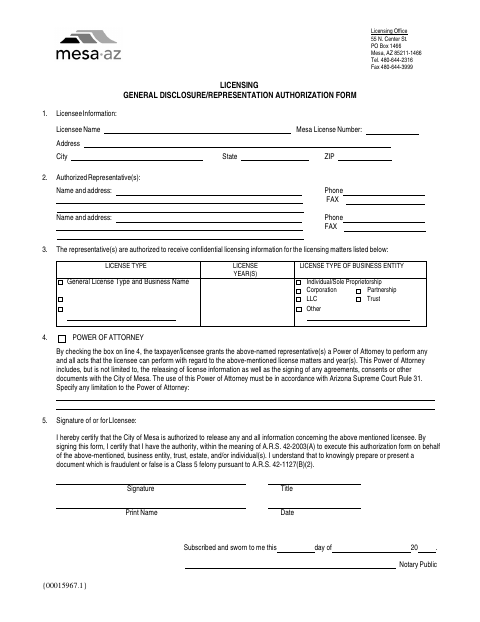
The form identifies the licensee, representatives, license type, license years, and business entity, and authorizes the City of Mesa to release licensing information. Checking the Power of Attorney box also grants representatives authority to perform licensing-related acts, including signing certain documents, subject to any limitations entered on the form. The licensee or an authorized signer completes it for the specified licensing matters.
Who needs it
A Mesa licensee or someone authorized to sign for the licensee needs this form to authorize representatives for specified licensing matters.
Why it needs a notary
The form carries a subscribed-and-sworn jurat; the licensee or authorized signer signs and swears to the authorization before the notary.
How to get this notarized
- 1
Download the Form
Get the General Disclosure and Representation Authorization Form from the City of Mesa.
- 2
Complete the Form
Enter the licensee and representative details, licensing matters, and any limits on the Power of Attorney.
- 3
Book an Online Notary
Schedule a live audio-video session with a commissioned online notary.
- 4
Sign on Video
Sign and swear to the form during the online notary session.
- 5
Submit to the City
Send the completed notarized form to the City of Mesa for the specified licensing matters.
Preview the form
The blank PDF straight from Mesa. Look it over, then upload your filled copy to start the notary session.

You’ll need ID and a webcam.
A licensed online notary will join you on video, verify your government-issued ID, witness your signature, and apply their seal. You’ll receive the notarized PDF by email when the session ends.
Frequently asked questions
- How do I notarize the Mesa licensing authorization form online?
- Complete the form, then book a live audio-video session with a commissioned online notary. Sign and swear to the form during the session, then submit it to the City of Mesa.
- Do I need to check the Power of Attorney box?
- Only check it if you intend to grant the representatives the broader authority described in section 4. The form also allows you to specify limitations.
- Can I use an online notary for this form?
- Arizona has authorized remote online notarization for its own notaries since July 2020 under A.R.S. §41-371 et seq., and recognizes notarial acts by notaries of other states under A.R.S. §33-501. Confirm with the city if unsure.
- What information does the form ask for?
- It asks for licensee and representative details, licensing matters and years, business entity type, any Power of Attorney limitations, and the signer’s signature, title, printed name, and date.