
Phoenix, AZ · Maricopa County
Permit Extension/Reinstatement Application
Phoenix permit holders use this application to request an extension of an unexpired permit or reinstatement of an expired permit.
What this form is
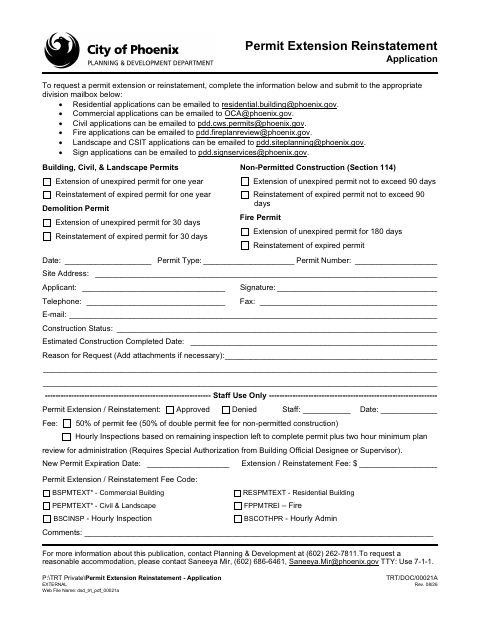
Use this application to request an extension or reinstatement for a building, demolition, non-permitted construction, or fire permit. The form asks for the permit type and number, site address, applicant and contact details, construction status, estimated completion date, and reason for the request. Add attachments if necessary; the form lists different request periods by permit category.
Who needs it
Permit holders requesting an extension or reinstatement should complete the application for their permit category.
How to submit it
Email residential applications to [email protected], commercial to [email protected], civil to [email protected], fire to [email protected], and landscape or CSIT to [email protected]; email sign applications to [email protected]. The form lists a fee for staff use.
About notarization
This application is signed and dated without a notary; the document mentions no attachment or related step that must be notarized or sworn.
How to submit this form
- 1
Download The Application
Download the Permit Extension/Reinstatement Application for the permit request.
- 2
Complete The Form
Enter the permit and site details, applicant contact information, construction status, estimated completion date, and reason for the request; sign and date it.
- 3
Gather Attachments
Add attachments if necessary, as indicated on the application.
- 4
Email The Application
Email it to the division mailbox listed for your permit category.
Frequently asked questions
- What does the Permit Extension/Reinstatement Application request?
- It requests an extension of an unexpired permit or reinstatement of an expired permit. The form covers several permit categories and asks for permit, site, applicant, construction, and request details.
- How do I submit the Permit Extension/Reinstatement Application?
- Email the completed application to the division mailbox listed for your permit category. The form provides separate email addresses for residential, commercial, civil, fire, landscape and CSIT, and sign applications.
- Do I need a notary for this application?
- No. The application has a signature and date field but no notary block. The document does not identify any attachment or related step that must be notarized or sworn.
Need something notarized?
This Permit Extension/Reinstatement Application doesn’t need a notary — but if you have another Phoenix form that does, a commissioned online notary can help.