
Tolleson, AZ · Maricopa County
Request for Court Record
This form lets an individual request Tolleson Municipal Court records, copies, an abstract, or audio CDs and certify the request’s purpose before a notary.
- licensed online notary
- ~15 min average
- Notarized PDF emailed
What you’ll need
- Government-issued photo ID
- Webcam-enabled device (laptop or phone)
- This form, ready to upload as a PDF
What this form is
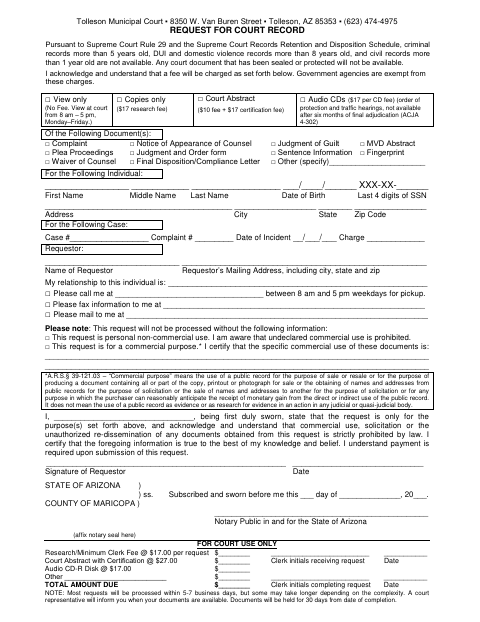
Use this form to request court documents or information for a named individual and, if applicable, a specific case. Select whether you want to view records, receive copies, request a court abstract, or order audio CDs, then provide the identifying, case, and delivery details requested. The form also requires you to state whether the request is for personal or commercial use and certify the information. The court notes that processing usually takes 5–7 business days.
Who needs it
A person requesting Tolleson Municipal Court records for an individual must complete this form and state the request’s purpose.
Why it needs a notary
The form includes a state jurat; the requestor signs and swears to the stated purpose and information before the notary.
How to get this notarized
- 1
Download the Form
Download the Request for Court Record form from the Tolleson Municipal Court.
- 2
Fill In the Request
Select the records or service, enter the individual and case details, provide delivery information, and state the request’s purpose.
- 3
Book an Online Notary
Schedule a session with a commissioned online notary for the sworn statement.
- 4
Sign on Video
Meet over live audio-video and sign the requestor’s certification when directed by the notary.
- 5
Submit to the Court
Submit the completed form and required payment to Tolleson Municipal Court.
Preview the form
The blank PDF straight from Tolleson. Look it over, then upload your filled copy to start the notary session.

You’ll need ID and a webcam.
A licensed online notary will join you on video, verify your government-issued ID, witness your signature, and apply their seal. You’ll receive the notarized PDF by email when the session ends.
Frequently asked questions
- How do I complete the court record request?
- Choose the records or service requested, enter the individual and case details, provide your contact and delivery information, and identify the request as personal or commercial. Sign the sworn statement before a notary, then submit the form and required payment to the court.
- Do I need to sign this form in front of a notary?
- Yes. The form contains a state jurat and says the requestor is first duly sworn. Sign the requestor’s certification before the notary, who completes the jurat and applies a seal.
- Can I use an online notary for this form?
- Arizona has authorized remote online notarization for its own notaries since July 2020 under A.R.S. §41-371 et seq. and recognizes notarial acts performed by notaries of other states under A.R.S. §33-501. A commissioned online notary can conduct the session over live audio-video; confirm with the city/town if unsure.
- How long does the court take to process a request?
- The form says most requests are processed within 5–7 business days, though some may take longer depending on complexity. A court representative will inform you when the documents are available, and documents are held for 30 days from completion.