
Windsor, CA · Sonoma County
Tree Hazard Evaluation Form
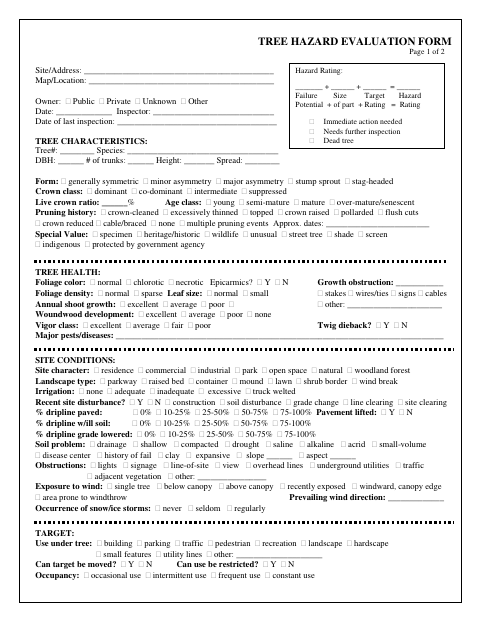
This form records a tree’s condition, site conditions, potential hazards, and recommended actions for an inspector evaluating a tree.
What this form is
The form provides sections to document a tree’s location, characteristics, health, site conditions, targets, defects, hazard rating, and possible hazard abatement. It identifies an inspector and includes fields for inspection dates, notification, and comments. The document does not state when the city requires the evaluation or how it must be submitted.
Who needs it
An inspector evaluating a tree can use this form to record its condition, hazard rating, and possible actions.
How to submit it
Submit it to the city department named on the form; check the city website for current contact details.
About notarization
This document is signed without a notary; the form includes an inspector and date field, and no sworn or notarized attachment is listed.
How to submit this form
- 1
Download The Form
Download the Tree Hazard Evaluation Form PDF.
- 2
Complete The Evaluation
Record the tree, site, target, defect, hazard rating, and abatement details requested on the form.
- 3
Gather Attachments
The document does not list attachments to gather.
- 4
Submit To The City
Submit it to the city department named on the form; check the city website for current contact details.
Frequently asked questions
- What does the Tree Hazard Evaluation Form record?
- It records tree characteristics, health, site conditions, targets, defects, hazard ratings, and possible hazard abatement actions.
- Who uses the Tree Hazard Evaluation Form?
- The form includes fields for an inspector to evaluate a tree and document its condition, potential hazards, and recommended actions.
- Do I need a notary for the Tree Hazard Evaluation Form?
- No. This document is signed without a notary; it has an inspector and date field, and no sworn or notarized attachment is listed.
- How do I submit the Tree Hazard Evaluation Form?
- The document does not provide submission instructions. Submit it to the city department named on the form; check the city website for current contact details.
Need something notarized?
This Tree Hazard Evaluation Form doesn’t need a notary — but if you have another Windsor form that does, a commissioned online notary can help.