
Winter Park, CO · Grand County
Electrical Permit Application
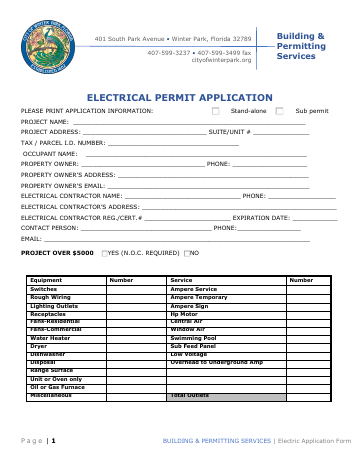
This two-page electrical permit application collects project, property, owner, contractor, and electrical work details for an applicant seeking an electrical permit.
- licensed online notary
- ~15 min average
- Notarized PDF emailed
What you’ll need
- Government-issued photo ID
- Webcam-enabled device (laptop or phone)
- This form, ready to upload as a PDF
What this form is
The application records project and property information, identifies the owner and electrical contractor, and lists electrical equipment and work for the project. Its signature page has acknowledgment blocks for both the owner and contractor. The PDF header and address identify a different Winter Park jurisdiction than the Colorado city named for this listing, so verify with the city that this is the correct application before completing or submitting it.
Who needs it
An owner and electrical contractor may need to complete and sign this application when applying for an electrical permit for a project.
Why it needs a notary
The form carries acknowledgment blocks stating the signer did not take an oath; the owner and contractor each sign before a notary.
How to get this notarized
- 1
Download The Application
Download the electrical permit application and verify with the city that this PDF is the correct form for your project.
- 2
Fill In The Form
Complete the project, property, owner, contractor, and electrical work fields that apply.
- 3
Book An Online Notary
Arrange a remote notarization only after confirming the city accepts online notarization for this application.
- 4
Sign On Video
The owner and contractor each complete their acknowledgment with the notary.
- 5
Submit To The City
Submit the completed application as directed by the city.
Preview the form
The blank PDF straight from Winter Park. Look it over, then upload your filled copy to start the notary session.

You’ll need ID and a webcam.
A licensed online notary will join you on video, verify your government-issued ID, witness your signature, and apply their seal. You’ll receive the notarized PDF by email when the session ends.
Frequently asked questions
- How do I complete and submit this electrical permit application?
- Complete the project, property, owner, contractor, and electrical work sections. The owner and contractor sign before a notary, then submit the application as directed by the city after confirming this is the correct form.
- Do I need a notary for this application?
- The form includes acknowledgment blocks for both the owner and contractor and states that signatures must be notarized. Confirm with the city or town if unsure.
- Can I use an online notary for this form?
- Colorado law authorizes a commissioned online notary to perform remote notarizations. Because this PDF identifies a different jurisdiction, ask the city whether it accepts online notarization for this application.
- Who signs before the notary?
- The form provides separate acknowledgment blocks for the owner and contractor. Each person signs in the corresponding block before a notary.