
Bloomfield, CT · Hartford County
Land Use Application
Bloomfield’s Land Use Application is for applicants seeking site plan, special permit, zoning map, regulation text, or other land-use review from the Town Plan and Zoning Commission.
- licensed online notary
- ~15 min average
- Notarized PDF emailed
What you’ll need
- Government-issued photo ID
- Webcam-enabled device (laptop or phone)
- This form, ready to upload as a PDF
What this form is
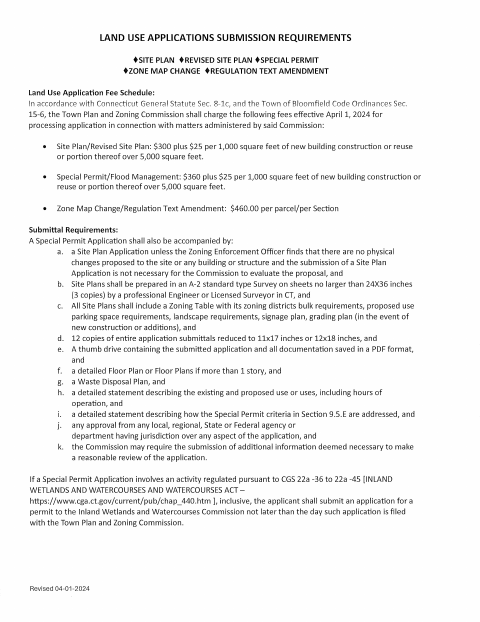
Use this form to describe the property and proposed use and to identify the type of review requested, such as a site plan, special permit, zone map change, or regulation text change. The submission requirements list supporting materials and applicable fees; special permit applications may also require a site plan and additional documents. The packet includes a conflict of interest disclosure that must be notarized and, for applications requiring a public hearing, a public hearing sign affidavit.
Who needs it
Applicants seeking review by Bloomfield’s Town Plan and Zoning Commission must submit this application and complete the disclosures that apply to their project.
How to get this notarized
- 1
Download the Application
Download Bloomfield’s Land Use Application and review the submission requirements and fee schedule.
- 2
Complete the Applicable Sections
Fill in the applicant, property, and project information, and complete the disclosures that apply to your application.
- 3
Book an Online Notary
Arrange an appointment with a commissioned online notary for the disclosure pages that require notarization.
- 4
Sign on Video
Follow the notary’s instructions and sign the applicable jurat pages during the online video session.
- 5
Submit to the Town
Include the notarized pages and required supporting materials with your submission to Bloomfield’s Planning and Zoning Department.
Preview the form
The blank PDF straight from Bloomfield. Look it over, then upload your filled copy to start the notary session.

You’ll need ID and a webcam.
A licensed online notary will join you on video, verify your government-issued ID, witness your signature, and apply their seal. You’ll receive the notarized PDF by email when the session ends.
Frequently asked questions
- How do I get the Bloomfield land-use disclosure notarized online?
- Complete the applicable disclosure, then book with a commissioned online notary. Sign during the video session as directed, and include the notarized page with your application submission.
- Do I need to notarize every page of the application?
- The form says the conflict of interest disclosure must be notarized. The public hearing sign affidavit also includes a notary block and is required for applications requiring a public hearing. Confirm with the town clerk if unsure.
- Can I sign the form before my online notary appointment?
- Wait to sign the document sections requiring notarization until the notary instructs you during the appointment. The packet contains jurat blocks for the conflict of interest disclosure and, when applicable, the public hearing sign affidavit.
- What supporting materials may a special permit application require?
- The form lists items such as a site plan, reduced application copies, a PDF on a thumb drive, floor plans, a waste disposal plan, and statements about the proposed use and special permit criteria. Requirements depend on the project.
- Does every application include the public hearing sign affidavit?
- The form says the affidavit is required for applications requiring a public hearing by the listed commissions and board. It must be returned to the Planning and Zoning Department on the hearing day.