
Bloomfield, CT · Hartford County
Non-Resident Affidavit for Property Tax Exemption
This affidavit lets an active-duty service member claim a personal property tax exemption based on military service and domicile, and is filed with the Connecticut city or town where the property is located.
- licensed online notary
- ~15 min average
- Notarized PDF emailed
What you’ll need
- Government-issued photo ID
- Webcam-enabled device (laptop or phone)
- This form, ready to upload as a PDF
What this form is
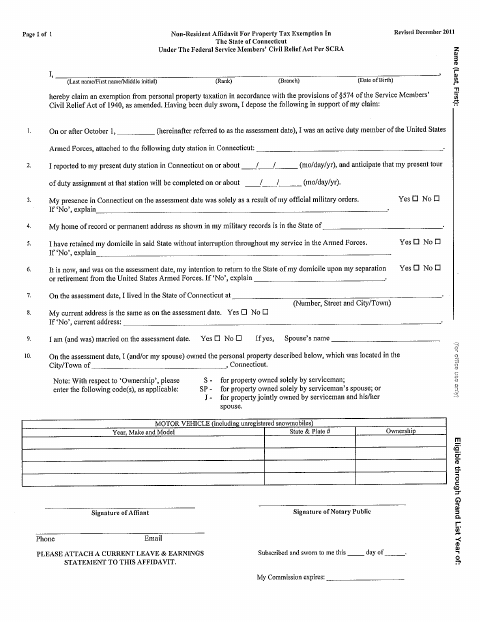
The affidavit records the service member’s duty station, domicile, Connecticut residence, and ownership of personal property, including a motor vehicle. It supports a claim for exemption from personal property taxation under the federal Servicemembers Civil Relief Act cited on the form. The form asks the affiant to attach a current Leave and Earnings Statement; submit the completed affidavit as directed by the municipality where the property is located.
Who needs it
An active-duty U.S. Armed Forces member claiming a personal property tax exemption for property located in a Connecticut city or town may need this affidavit.
How to get this notarized
- 1
Download the Affidavit
Get Bloomfield’s Non-Resident Affidavit for Property Tax Exemption.
- 2
Fill Out the Form
Complete the service, domicile, address, and property information, and attach a current Leave and Earnings Statement.
- 3
Book an Online Notary
Schedule a remote notarization with a commissioned online notary.
- 4
- 5
Submit to the Municipality
Send the completed affidavit and attachment as directed by the municipality where the property is located.
Preview the form
The blank PDF straight from Bloomfield. Look it over, then upload your filled copy to start the notary session.

You’ll need ID and a webcam.
A licensed online notary will join you on video, verify your government-issued ID, witness your signature, and apply their seal. You’ll receive the notarized PDF by email when the session ends.
Frequently asked questions
- How do I complete the Bloomfield military property tax affidavit?
- Fill in the requested military service, domicile, address, and property details, attach a current Leave and Earnings Statement, and sign under oath before a notary. Submit it as directed by the municipality.
- Do I need to attach a Leave and Earnings Statement?
- Yes. The form specifically asks you to attach a current Leave and Earnings Statement to the affidavit.
- Can I sign this affidavit with a commissioned online notary?
- Connecticut authorizes remote online notarization for its own notaries under Public Act 23-28, effective October 1, 2023. Connecticut law also recognizes certain notarial acts performed outside the state. Confirm the receiving municipality accepts your notarized form.
- Where do I submit the completed affidavit?
- The form concerns property located in a Connecticut city or town but does not name a submission office. Check the municipality’s instructions; confirm with the town clerk if unsure.
Non-Resident Affidavit for Property Tax Exemption in other Connecticut cities
Each city publishes its own version of this form. Pick the city where you’re filing.