
Clarendon Hills, IL · DuPage County
Cost Recovery Form
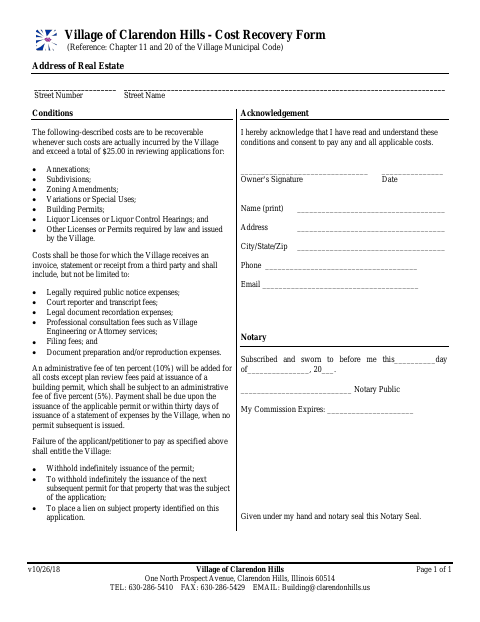
The Cost Recovery Form records an applicant’s or petitioner’s consent to pay eligible Village expenses incurred while reviewing certain permit, license, zoning, subdivision, or annexation applications.
- licensed online notary
- ~15 min average
- Notarized PDF emailed
What you’ll need
- Government-issued photo ID
- Webcam-enabled device (laptop or phone)
- This form, ready to upload as a PDF
What this form is
The form identifies the real estate and explains when the Village may recover third-party expenses for reviewing listed applications, along with applicable administrative fees and payment deadlines. It also acknowledges that unpaid costs may affect permit issuance or result in a lien on the property. The applicant or petitioner completes it in connection with an application covered by the form’s conditions.
Who needs it
An owner or applicant/petitioner for a listed Village application may need to complete this form for the real estate under review.
Why it needs a notary
The form has a “Subscribed and sworn to before me” jurat; the owner signs the acknowledgment before the notary and provides the signature date and printed name.
How to get this notarized
- 1
Download the Form
Get the Cost Recovery Form from the Village of Clarendon Hills website.
- 2
Complete the Form
Enter the real estate address and owner information, then review the cost recovery conditions.
- 3
Book an Online Notary
Schedule a session with a commissioned online notary and have identification ready.
- 4
Sign on Video
Sign during the online session so the notary can complete the subscribed-and-sworn jurat.
- 5
Submit to the Village
Submit the completed form as directed with the related application.
Preview the form
The blank PDF straight from Clarendon Hills. Look it over, then upload your filled copy to start the notary session.

You’ll need ID and a webcam.
A licensed online notary will join you on video, verify your government-issued ID, witness your signature, and apply their seal. You’ll receive the notarized PDF by email when the session ends.
Frequently asked questions
- How do I complete the Cost Recovery Form?
- Enter the real estate address and owner details, review the cost and payment conditions, then sign the acknowledgment before a notary. Submit the completed form with your application as directed.
- Do I need to sign this form in front of a notary?
- Yes. The form includes a “Subscribed and sworn to before me” jurat, so the owner must sign before a notary administers the oath and completes the notarial section.
- Can I use an online notary for this form?
- Illinois authorizes electronic and remote notarization by notaries commissioned in the state. It also recognizes notarial acts performed outside Illinois when the officer is authorized where the act takes place. Confirm with the city or village if unsure.
- What costs does the form cover?
- It covers qualifying third-party costs the Village incurs reviewing the listed applications, when those costs exceed $25. The form describes possible expenses, administrative fees, payment timing, and consequences of nonpayment.