
Carmel, IN · Hamilton County
Condominium Application
Carmel’s Condominium Application collects applicant, owner, project, site, and surveyor information for a proposed condominium and is filed by the applicant seeking condominium review.
- licensed online notary
- ~15 min average
- Notarized PDF emailed
What you’ll need
- Government-issued photo ID
- Webcam-enabled device (laptop or phone)
- This form, ready to upload as a PDF
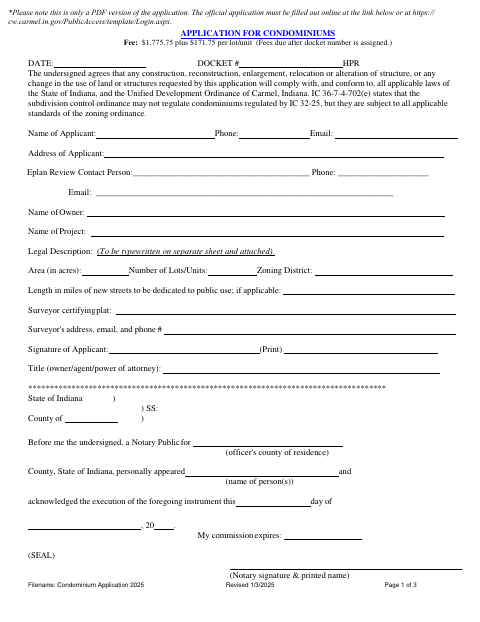
What this form is
The application records project details, including the legal description, acreage, number of units, zoning district, and surveyor information. Its accompanying checklist outlines plat, construction plan, supporting data, and guarantee materials, and says the application, secondary plat, construction plans, supporting documents, and fee are submitted to the Department of Community Services. The PDF notes that the official application must be completed online through Carmel’s Public Portal.
Who needs it
An applicant seeking Carmel condominium review uses this form and submits the listed plat, construction plans, supporting materials, and fee.
Why it needs a notary
The applicant signs before a notary, who completes the acknowledgment stating the signer personally appeared and acknowledged execution of the instrument.
How to get this notarized
- 1
Download the Application
Get the Condominium Application PDF and review its three pages, including the checklist.
- 2
Complete the Application
Enter applicant, owner, project, site, and surveyor information; prepare the separate typewritten legal description and listed supporting materials.
- 3
Book an Online Notary
Arrange an online notarization for the applicant’s signature and acknowledgment.
- 4
Sign on Video
Appear by video before a commissioned online notary and acknowledge execution of the application.
- 5
Submit to Carmel
Complete the official application through Carmel’s Public Portal and submit plans and documents through ProjectDox as directed.
Preview the form
The blank PDF straight from Carmel. Look it over, then upload your filled copy to start the notary session.

You’ll need ID and a webcam.
A licensed online notary will join you on video, verify your government-issued ID, witness your signature, and apply their seal. You’ll receive the notarized PDF by email when the session ends.
Frequently asked questions
- How do I submit Carmel’s Condominium Application?
- The PDF says the official application must be completed online through Carmel’s Public Portal. It also directs applicants to submit plans and documents electronically through ProjectDox.
- Do I need to notarize the Condominium Application?
- Yes. The form includes an acknowledgment for the signer to appear before a notary and acknowledge execution of the instrument.
- Can I sign this form with a commissioned online notary?
- Indiana authorizes its notaries to perform remote online notarizations with a remote notary public endorsement under IC 33-42-17. IC 33-42-9-8 recognizes notarial acts performed by a notary public or other authorized officer of another state.
- What supporting materials does the checklist describe?
- The checklist describes a plat and construction plans, supporting data and approvals, construction plan details, and financial performance and maintenance guarantees. Check the complete checklist for the materials relevant to your project.
- Where do I submit the application materials?
- The PDF directs applicants to complete the official application through Carmel’s Public Portal and submit plans and documents through ProjectDox. Confirm with the city or town if unsure.