
Middleborough, MA · Plymouth County
Declaration of Reserved Easements
This declaration records easements reserved on a definitive subdivision plan and is completed by subdivision landowners seeking approval from the Middleborough Planning Board.
- licensed online notary
- ~15 min average
- Notarized PDF emailed
What you’ll need
- Government-issued photo ID
- Webcam-enabled device (laptop or phone)
- This form, ready to upload as a PDF
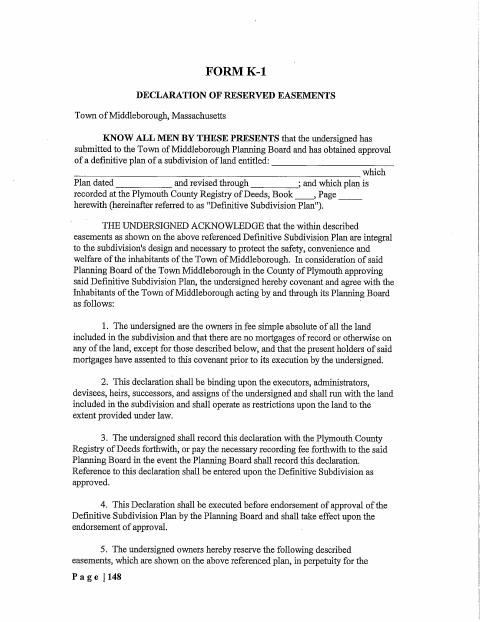
What this form is
The declaration identifies easements shown on a definitive subdivision plan and sets out how they benefit specified road and lot owners and their successors. It also addresses ownership, mortgages, recording, and possible amendments. The form says the owners must execute it before the Planning Board endorses approval of the plan; it takes effect upon that endorsement. The declaration is to be recorded at the registry of deeds, either by the owners or, if the Board does so, after payment of the recording fee.
Who needs it
Owners of land in a Middleborough subdivision with reserved easements use this declaration as part of obtaining Planning Board endorsement of a definitive subdivision plan.
Why it needs a notary
The form carries acknowledgment blocks, and the landowners and any mortgagee or Planning Board member signing in the applicable block must acknowledge the signature before a notary.
How to get this notarized
- 1
Download the Form
Get the Declaration of Reserved Easements from the Town of Middleborough.
- 2
Fill In the Declaration
Complete the applicable owner, plan, easement, deed, and mortgage details.
- 3
Book an Online Notary
Arrange a remote session with a commissioned online notary for the applicable acknowledgment block.
- 4
Sign on Video
Appear for the video session and acknowledge your signature when directed by the notary.
- 5
Submit to the City
Follow the form's instructions for Planning Board endorsement and recording at the registry of deeds.
Preview the form
The blank PDF straight from Middleborough. Look it over, then upload your filled copy to start the notary session.

You’ll need ID and a webcam.
A licensed online notary will join you on video, verify your government-issued ID, witness your signature, and apply their seal. You’ll receive the notarized PDF by email when the session ends.
Frequently asked questions
- How do I get the declaration notarized online?
- Complete the form, then book a session with a commissioned online notary. Sign during the video session when instructed and follow the city or town clerk's guidance for submission.
- Do I need to sign this declaration before a notary?
- Yes. The form includes acknowledgment blocks stating that signers personally appeared before a notary and acknowledged signing voluntarily for the stated purpose.
- Can I use an online notary for this form?
- Massachusetts permanently authorized remote online notarization for its own notaries effective January 1, 2024, under G.L. c. 222, §§27–29, inserted by Chapter 2 of the Acts of 2023.
- Where does the declaration say it must be recorded?
- The form says the declaration must be recorded at the registry of deeds, either by the owners or by the Planning Board if it records the document.
- What if I am unsure how to submit the form?
- The form addresses Planning Board endorsement and recording at the registry of deeds. Confirm with the city or town clerk if unsure.