
Southfield, MI · Oakland County
Business License Application
This application requests a Southfield business license and collects business, applicant, operating, and police record information from the person applying to operate a business in the city.
- licensed online notary
- ~15 min average
- Notarized PDF emailed
What you’ll need
- Government-issued photo ID
- Webcam-enabled device (laptop or phone)
- This form, ready to upload as a PDF
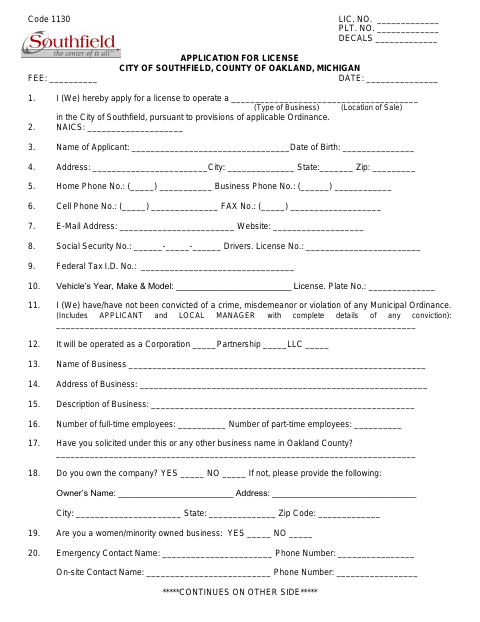
What this form is
The City of Southfield application requests a license to operate a business in the city under applicable ordinance provisions. Applicants provide personal and business details, operating information, and answers about prior convictions and license suspensions; additional questions apply to certain business activities, including vending, tree services, and taxi cabs. A police record check section also requests identifying and driving record information. The completed application is mailed to the City Clerk’s Office.
Who needs it
A person applying for a Southfield license to operate a business in the city should complete the application and provide the requested business and police record information.
Why it needs a notary
The application carries a sworn jurat stating the applicant appeared, was duly sworn, and affirmed the answers are true; the applicant signs before the notary.
How to get this notarized
- 1
Download the Application
Get the City of Southfield Business License Application PDF.
- 2
Fill In the Form
Complete the applicant, business, operating, and police record sections that apply.
- 3
Book an Online Notary
Arrange a session with a commissioned online notary for the sworn statement.
- 4
Sign on Video
Appear before the notary remotely and sign the sworn statement as directed.
- 5
Submit to the City
Mail the completed application to the Southfield City Clerk’s Office at the address printed on the form.
Preview the form
The blank PDF straight from Southfield. Look it over, then upload your filled copy to start the notary session.

You’ll need ID and a webcam.
A licensed online notary will join you on video, verify your government-issued ID, witness your signature, and apply their seal. You’ll receive the notarized PDF by email when the session ends.
Frequently asked questions
- How do I complete the Southfield business license application?
- Fill in the applicant, business, operating, and police record information requested on the form, sign the sworn statement before a notary, and mail the completed application to the City Clerk’s Office.
- Do I need to sign the application in front of a notary?
- Yes. The application includes a sworn statement that you personally appear, are duly sworn, and affirm the statements and answers are true. Sign that statement before a notary.
- Can I use online notarization for this application?
- Michigan permits its notaries to perform remote electronic notarizations, and an authorized officer’s notarial act performed in another state has the same effect under Michigan law. Confirm acceptance with the City Clerk if unsure.
- Where do I send the completed application?
- The form says to mail the completed application to City of Southfield, Attn: City Clerk’s Office, 26000 Evergreen Road, Southfield, MI 48076.
Other forms in Southfield
Business License Application in other Michigan cities
Each city publishes its own version of this form. Pick the city where you’re filing.