
Southfield, MI · Oakland County
Land Vacation Application
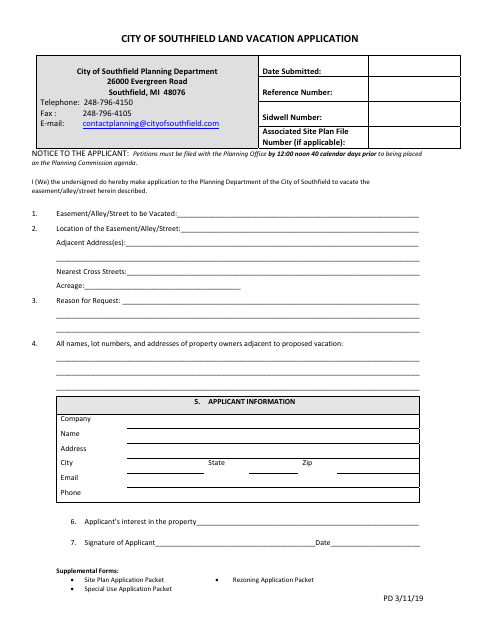
The Southfield Planning Department application lets a petitioner request vacation of an easement, alley, or street and provide location, ownership, and applicant details.
- licensed online notary
- ~15 min average
- Notarized PDF emailed
What you’ll need
- Government-issued photo ID
- Webcam-enabled device (laptop or phone)
- This form, ready to upload as a PDF
What this form is
Use this application to ask the City of Southfield to vacate an easement, alley, or street. It requests the location, reason for the request, adjacent property owners, and applicant information, and includes a letter of understanding and property-owner acknowledgment. The Planning Department requires the application, fee, and plan materials; petitions must be filed by noon 40 calendar days before a Planning Commission agenda.
Who needs it
A petitioner seeking to vacate an easement, alley, or street in Southfield must submit the application and provide the requested property and applicant information.
Why it needs a notary
The form has an acknowledgment block; each property owner signing the Owner line in the letter of understanding must acknowledge the instrument before a notary.
How to get this notarized
- 1
Download the Application
Get the Land Vacation Application from the City of Southfield and review the petition deadline and submittal instructions.
- 2
Fill In the Form
Provide the vacation location, reason, adjacent property-owner details, and applicant information.
- 3
Book an Online Notary
Arrange an online notarization for the property owner signing the Owner line in the letter of understanding.
- 4
Sign on Video
The property owner acknowledges the instrument before a commissioned online notary by video.
- 5
Submit to the City
Submit the application, required fee, and plan materials to the Southfield Planning Department according to its instructions.
Preview the form
The blank PDF straight from Southfield. Look it over, then upload your filled copy to start the notary session.

You’ll need ID and a webcam.
A licensed online notary will join you on video, verify your government-issued ID, witness your signature, and apply their seal. You’ll receive the notarized PDF by email when the session ends.
Frequently asked questions
- How do I get the property-owner acknowledgment notarized?
- Each property owner signs the Owner line in the letter of understanding and acknowledges the instrument before a notary. Book a session with a commissioned online notary and follow the signing instructions.
- Do I need to notarize the applicant signature?
- The form’s notary block is for the property-owner acknowledgment, and the letter of understanding has separate Petitioner and Owner signature lines. Confirm with the city, village or township if unsure.
- Can I sign this form with an online notary?
- Michigan allows remote electronic notarization by its authorized notaries. A commissioned online notary can conduct the acknowledgment by video; check with Southfield Planning Department that it accepts the remotely notarized document.
- What else must I submit with the application?
- The form’s submittal instructions call for the application and fee, two full-sized folded plan or survey sets, and a PDF of the plans. The city may request revised plans and final copies during review.