
Southfield, MI · Oakland County
Vacant Building Registration
This application registers a vacant residential or commercial building and accessory structures with Southfield, and is completed by the property owner with building, contact, and vacancy information.
- licensed online notary
- ~15 min average
- Notarized PDF emailed
What you’ll need
- Government-issued photo ID
- Webcam-enabled device (laptop or phone)
- This form, ready to upload as a PDF
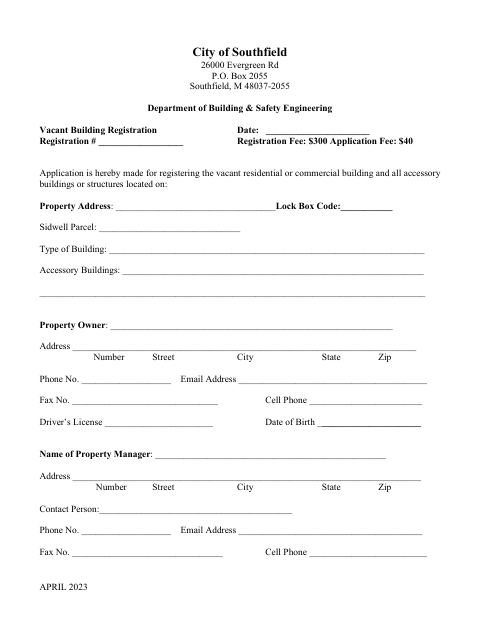
What this form is
Use this application to register a vacant residential or commercial building and any accessory buildings or structures at the listed property address. The owner provides property and contact details, explains the reason for vacancy, and answers questions about reoccupancy or demolition. The owner affidavit certifies the information and agrees to reasonable inspections at least twice a year; the form also includes spaces for registration approval and follow-up dates.
Who needs it
The legal owner of a vacant residential or commercial building in Southfield completes the application and provides information about the property, vacancy, and plans.
How to get this notarized
- 1
Download the Application
Get the City of Southfield Vacant Building Registration application.
- 2
Fill In the Application
Provide the property, owner, manager, and vacancy information requested on the form.
- 3
Book an Online Notary
Arrange a remote notarization with a commissioned online notary for the owner affidavit.
- 4
- 5
Submit to the City
Submit the completed application to the City of Southfield Department of Building & Safety Engineering.
Preview the form
The blank PDF straight from Southfield. Look it over, then upload your filled copy to start the notary session.

You’ll need ID and a webcam.
A licensed online notary will join you on video, verify your government-issued ID, witness your signature, and apply their seal. You’ll receive the notarized PDF by email when the session ends.
Frequently asked questions
- How do I complete the Vacant Building Registration?
- Fill in the property, owner, manager, and vacancy details. Sign the owner affidavit before a notary, then submit the application to the City of Southfield.
- Do I need to sign the owner affidavit before a notary?
- Yes. The application says the owner must subscribe and swear to the affidavit before a notary.
- Can I notarize this application online?
- Michigan law authorizes remote electronic notarization by a commissioned online notary. A notarial act performed in another state by an authorized officer has the same effect under MCL 55.285a.
- What information does the application ask for?
- It asks for the property address and parcel details, owner and property manager contacts, the reason for vacancy, and whether reoccupancy or demolition is planned.
- Where do I submit the completed application?
- The form identifies the City of Southfield Department of Building & Safety Engineering. Confirm with the city, village or township if unsure.