
Springfield, MO · Greene County
Nominating Petition for Historic Landmark
This petition lets property owners or their authorized agents nominate a described area for Historic Landmark designation in Springfield and provide evidence that it meets the stated selection criteria.
- licensed online notary
- ~15 min average
- Notarized PDF emailed
What you’ll need
- Government-issued photo ID
- Webcam-enabled device (laptop or phone)
- This form, ready to upload as a PDF
What this form is
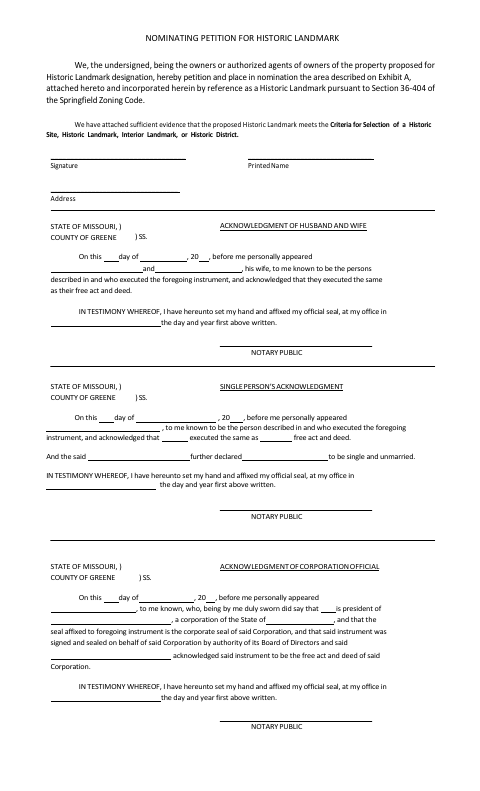
The petition identifies the area proposed for Historic Landmark designation by referring to an attached Exhibit A, and states that evidence supporting the nomination is attached. Owners or authorized agents sign the form and use the acknowledgment block that fits their situation: husband and wife, single person, or corporation official. The petition refers to Section 36-404 of the Springfield Zoning Code and the stated criteria for selecting historic sites, landmarks, interiors, or districts.
Who needs it
Property owners or their authorized agents seeking to nominate an area for Historic Landmark designation in Springfield can use this petition.
Why it needs a notary
The form provides acknowledgment blocks for a husband and wife, a single person, or a corporation official; the applicable signer appears before the notary and acknowledges the instrument.
How to get this notarized
- 1
Download The Petition
Get the Nominating Petition for Historic Landmark from the City of Springfield.
- 2
Complete The Petition
Fill in the requested information, attach Exhibit A, and include evidence that the proposed landmark meets the stated selection criteria.
- 3
Book An Online Notary
Schedule a commissioned online notary and select the acknowledgment block that matches the signer.
- 4
Sign On Video
Appear before the notary by video and acknowledge the instrument; follow the notary's instructions for completing the form.
- 5
Submit To The City
Submit the completed petition and attachments to the City of Springfield, following its filing instructions.
Preview the form
The blank PDF straight from Springfield. Look it over, then upload your filled copy to start the notary session.

You’ll need ID and a webcam.
A licensed online notary will join you on video, verify your government-issued ID, witness your signature, and apply their seal. You’ll receive the notarized PDF by email when the session ends.
Frequently asked questions
- How do I notarize the historic landmark petition online?
- Complete the petition and Exhibit A, then book a commissioned online notary. Signers appear by video and acknowledge the instrument using the applicable acknowledgment block.
- Do I need to attach Exhibit A?
- Yes. The petition describes the proposed area on Exhibit A, which it says is attached and incorporated by reference.
- Which acknowledgment block should I use?
- The form provides separate blocks for a husband and wife, a single person, and a corporation official. Confirm with the city or town if unsure.
- Can I use a commissioned online notary for this form?
- Missouri law authorizes remote online notarization by a commissioned online notary. Check that the receiving office accepts the completed notarized document before submitting it.