
Springfield, MO · Greene County
Subordination Agreement
This agreement lets a deed-of-trust holder consent to a plat’s streets and easements and subordinate the deed of trust to them when the document is filed with the City of Springfield.
- licensed online notary
- ~15 min average
- Notarized PDF emailed
What you’ll need
- Government-issued photo ID
- Webcam-enabled device (laptop or phone)
- This form, ready to upload as a PDF
What this form is
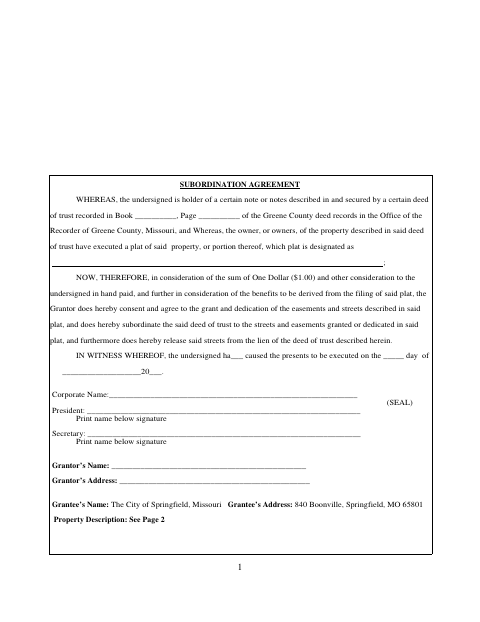
The agreement identifies a deed of trust recorded in Greene County and lets its holder consent to the streets and easements shown on a property plat, subordinate the deed of trust to them, and release the streets from its lien. The form names the City of Springfield as grantee and provides space for the property description on page two. It is used in connection with filing the plat described in the agreement.
Who needs it
The holder of a deed of trust affecting property being platted may need this agreement to consent to the plat’s streets and easements and subordinate the lien.
Why it needs a notary
The form has an acknowledgment block, where the named signers must appear before the notary and acknowledge signing the agreement as their free act and deed.
How to get this notarized
- 1
Download the Form
Get the Subordination Agreement from the City of Springfield and review both pages, including the property-description section.
- 2
Fill In the Agreement
Enter the deed-of-trust recording details, plat designation, execution date, grantor information, and property description.
- 3
Book an Online Notary
Arrange a session with a commissioned online notary for the acknowledgment.
- 4
Sign on Video
The named signers appear before the notary by video and acknowledge signing the agreement as their free act and deed.
- 5
Submit to the City
Submit the completed agreement in connection with the plat filing. Confirm the appropriate filing route with the city or recorder.
Preview the form
The blank PDF straight from Springfield. Look it over, then upload your filled copy to start the notary session.

You’ll need ID and a webcam.
A licensed online notary will join you on video, verify your government-issued ID, witness your signature, and apply their seal. You’ll receive the notarized PDF by email when the session ends.
Frequently asked questions
- How do I get this subordination agreement notarized?
- Complete the form, then book with a commissioned online notary. The named signers appear on video, show identification, and acknowledge signing as their free act and deed.
- Do I need to sign in front of a notary?
- Yes. The form includes an acknowledgment stating that the named persons appeared before a notary and acknowledged executing the agreement as their free act and deed.
- Who signs the agreement?
- The undersigned deed-of-trust holder signs. The form includes fields for a corporate name and president and secretary, or for an individual grantor’s name and address.
- How do I submit the signed agreement?
- The form refers to Greene County deed records and the Recorder of Greene County. Documents for a recorder of deeds may be e-recorded where supported, usually through a title company; confirm with the city or town if unsure.
- Can I use online notarization for this form?
- Missouri authorizes its own notaries to perform remote online notarizations. A commissioned online notary can notarize the acknowledgment remotely; check that the receiving office accepts the completed document.