
Conway, NH · Carroll County
Authorized Representative Declaration
This form lets a General Assistance applicant or recipient name someone to help with applications, interviews, paperwork, and communications with the Town of Conway.
- licensed online notary
- ~15 min average
- Notarized PDF emailed
What you’ll need
- Government-issued photo ID
- Webcam-enabled device (laptop or phone)
- This form, ready to upload as a PDF
What this form is
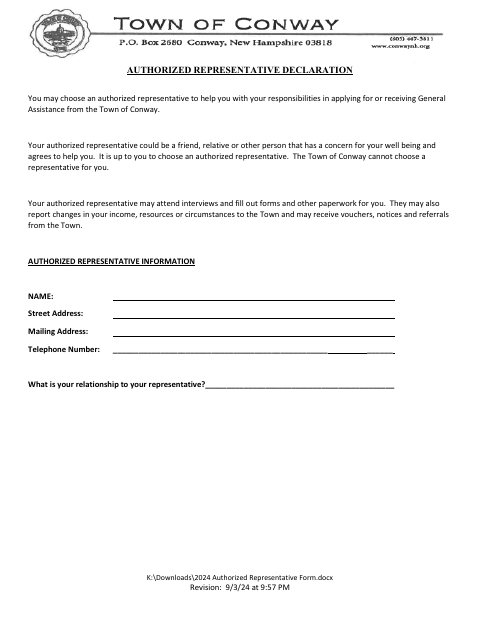
Use this form when you choose someone to help you apply for or receive General Assistance from the Town of Conway. It records the representative’s contact information and your relationship, and explains the representative’s possible duties and your responsibilities for information they report. The form has separate signature and acknowledgment sections for you and your authorized representative.
Who needs it
A person applying for or receiving General Assistance from the Town of Conway who chooses someone to help with interviews, paperwork, or communications with the Town may use this form.
Why it needs a notary
The form carries acknowledgment blocks for both signers; the client and authorized representative each sign their own section before a notary or other authorized officer.
How to get this notarized
- 1
Download The Form
Get the Authorized Representative Declaration from the Town of Conway.
- 2
Fill In The Information
Add the representative’s contact details and your relationship, then review the statements on the form.
- 3
Book An Online Notary
Arrange an online notarization with a commissioned online notary for both signers.
- 4
Sign On Video
The client and representative each sign their own section during the online notary session.
- 5
Submit To The Town
Send the completed form to the Town of Conway as directed for your General Assistance case.
Preview the form
The blank PDF straight from Conway. Look it over, then upload your filled copy to start the notary session.

You’ll need ID and a webcam.
A licensed online notary will join you on video, verify your government-issued ID, witness your signature, and apply their seal. You’ll receive the notarized PDF by email when the session ends.
Frequently asked questions
- How do I complete the Authorized Representative Declaration?
- Fill in the representative’s information and relationship, review the statements, and have the client and representative each sign their own section before a notary or other authorized officer.
- Do I need to notarize both signatures?
- The form provides a separate acknowledgment block for the client and the authorized representative. Each signer should complete their own section before a notary or other authorized officer.
- Can I sign this form with an online notary?
- New Hampshire authorizes remote online notarization for its own notaries under RSA 456-B:6-a. You can book with a commissioned online notary; check that the Town will accept the completed form.
- Who can be my authorized representative?
- The form says you may choose a friend, relative, or other person concerned for your well-being who agrees to help. The Town of Conway cannot choose a representative for you.
- Where do I submit the completed form?
- The form concerns General Assistance from the Town of Conway. Confirm the submission method with the Town; confirm with the town/city if unsure.