
Lumberton, NJ · Burlington County
Bingo License Application
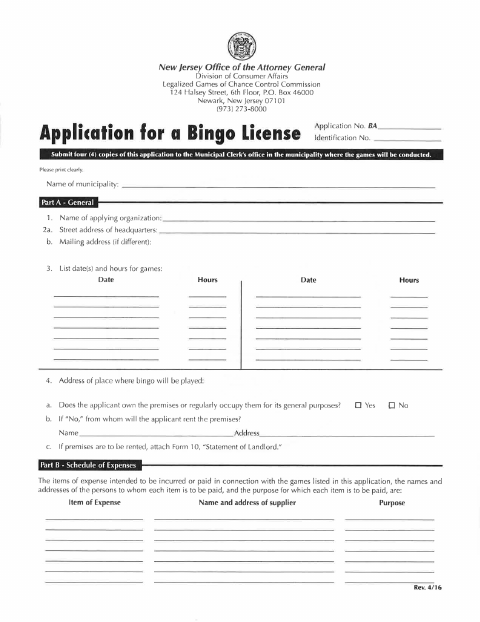
This application requests a license to conduct bingo games and is filed by an eligible organization with the municipality where the games will be held.
- licensed online notary
- ~15 min average
- Notarized PDF emailed
What you’ll need
- Government-issued photo ID
- Webcam-enabled device (laptop or phone)
- This form, ready to upload as a PDF
What this form is
The application identifies the organization, game dates and location, planned expenses, use of proceeds, prizes, and people who will conduct or assist with the games. Lumberton's instructions require four application packets, each with a notarized original signature page, submitted to the Municipal Clerk's Office where the game will be held. The packet also includes biennial registration affidavit materials and supporting documents.
Who needs it
An organization applying to conduct bingo games in Lumberton must submit the application packets and required supporting materials to the Municipal Clerk's Office.
Why it needs a notary
The bingo application carries a state-and-county jurat for the sworn statements; its applicant signs before the notary, and the attached registration affidavit must also be signed before a notary or attorney.
How to get this notarized
- 1
Download The Application
Get the bingo license application and review the instructions and accompanying registration affidavit materials.
- 2
Complete The Packet
Fill in the organization, game, expense, proceeds, prize, and participant information, and gather the required supporting documents.
- 3
Book An Online Notary
Arrange a remote session with a commissioned online notary for the required notarized signature page.
- 4
Sign On Video
Sign the required page during the notary's video session and follow any instructions for the attached affidavit.
- 5
Submit To The City
Prepare four application packets, each with a notarized original signature page, and submit them to the Municipal Clerk's Office where the game will be held.
Preview the form
The blank PDF straight from Lumberton. Look it over, then upload your filled copy to start the notary session.

You’ll need ID and a webcam.
A licensed online notary will join you on video, verify your government-issued ID, witness your signature, and apply their seal. You’ll receive the notarized PDF by email when the session ends.
Frequently asked questions
- How do I get the bingo application notarized?
- Complete the application, then book a commissioned online notary. Sign the jurat page during the video session and include the notarized original in each required packet.
- Do I need to submit multiple copies?
- Yes. The form instructions call for four application packets, each including a notarized original signature page, submitted to the Municipal Clerk's Office where the game will be held.
- Can I sign this form with an online notary?
- New Jersey has permanently authorized remote online notarization and remote ink notarization for its own notaries since October 2021. A commissioned online notary can perform a remote session; confirm the municipality accepts the notarized document.
- Where do I file the completed application?
- The instructions say to submit the application to the Municipal Clerk's Office in the municipality where the game will be held or drawn. Confirm with the municipality if unsure.
Other forms in Lumberton
Bingo License Application in other Burlington County cities
Each city publishes its own version of this form. Pick the city where you’re filing.