
Princeton, NJ · Mercer County
Historic Preservation Plan Review Application
Princeton property owners and applicants use this application to request review of proposed work in a historic preservation district or buffer district, including construction, alterations, demolition, landscaping, and other improvements.
- licensed online notary
- ~15 min average
- Notarized PDF emailed
What you’ll need
- Government-issued photo ID
- Webcam-enabled device (laptop or phone)
- This form, ready to upload as a PDF
What this form is
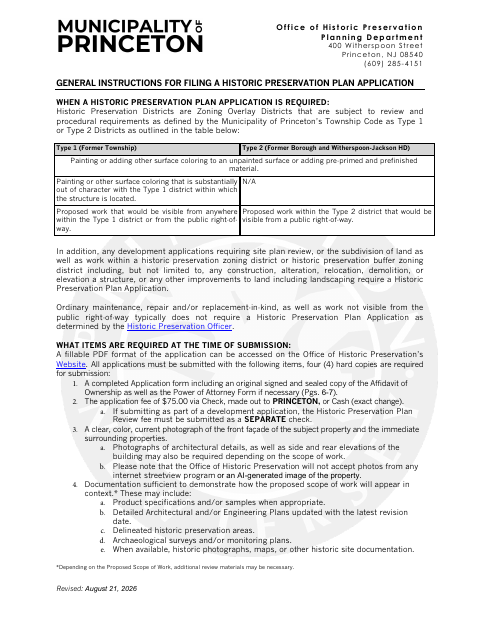
Princeton uses this application to review proposed work in historic preservation districts and buffer districts, including certain visible work, construction, alterations, relocation, demolition, and landscaping. The form requests owner, property, applicant, and project details; an ownership affidavit must accompany the submission, and a power of attorney is required when someone other than the owner applies. The instructions also call for four hard copies, a fee, photographs, and supporting project materials.
Who needs it
Property owners or their authorized applicants proposing work subject to Princeton historic preservation review should complete this application and provide the required supporting materials.
How to get this notarized
- 1
Download The Application
Get the Historic Preservation Plan Review Application from Princeton’s Office of Historic Preservation.
- 2
Complete The Form
Fill in the owner, property, applicant, and project details. Gather the photographs and supporting materials required for your scope of work.
- 3
Book An Online Notary
Schedule a remote appointment to notarize the Affidavit of Ownership. Leave its signature lines unsigned until instructed.
- 4
- 5
Submit To The City
Include the notarized affidavit, application, fee, four hard copies, photographs, and supporting materials in your submission to Princeton.
Preview the form
The blank PDF straight from Princeton. Look it over, then upload your filled copy to start the notary session.

You’ll need ID and a webcam.
A licensed online notary will join you on video, verify your government-issued ID, witness your signature, and apply their seal. You’ll receive the notarized PDF by email when the session ends.
Frequently asked questions
- How do I notarize the Affidavit of Ownership?
- Complete the affidavit but wait to sign. Meet with a commissioned online notary by video, take the oath, and sign as directed. Include the notarized affidavit with your application.
- Do I need a notary for the Power of Attorney page?
- The form’s Power of Attorney page contains an owner signature line but no notary block. The Affidavit of Ownership on the preceding page has a jurat and requires an oath before a notary.
- Can I use remote online notarization for this affidavit?
- New Jersey has permanently authorized remote online notarization and remote ink notarization for its own notaries since October 2021 (P.L. 2021, c.179, N.J.S.A. 52:7-10.9 et seq.). Confirm with the municipality if unsure.
- What else must I submit with the application?
- The instructions require four hard copies, the application fee, a current color photograph, and documentation showing the proposed work in context. Additional materials may be needed depending on the project.