
Princeton, NJ · Mercer County
Application for Site Plan Review
This five-page application is for property owners or other applicants seeking Princeton Planning Board review of proposed site development, including major, minor, preliminary, final, or concept review.
- licensed online notary
- ~15 min average
- Notarized PDF emailed
What you’ll need
- Government-issued photo ID
- Webcam-enabled device (laptop or phone)
- This form, ready to upload as a PDF
What this form is
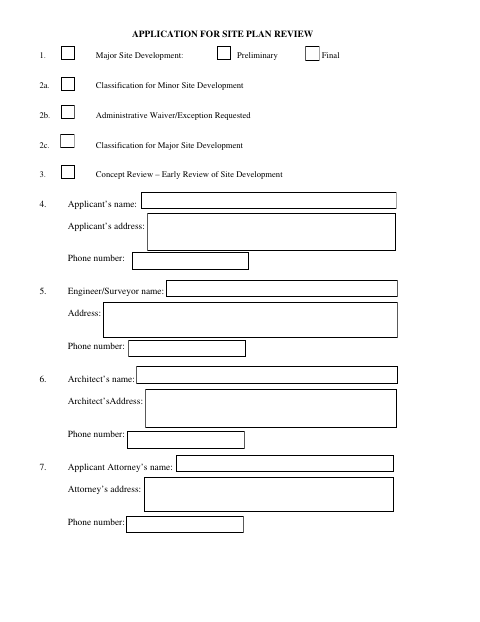
Princeton’s Planning Board uses this application to review proposed site development, including major or minor projects, preliminary or final major plans, and concept reviews. Applicants identify the property and project team, list any requested zoning variances, and submit plans and narratives about the proposed development and its impacts. The form also includes owner consent when someone other than the owner applies and a certification that the application and supporting materials are true and complete.
Who needs it
Property owners or applicants proposing site development in Princeton, including representatives filing with the owner’s consent, use this form to seek Planning Board review.
Why it needs a notary
The form carries sworn-and-subscribed jurat blocks; the owner signs the consent when a non-owner applies, and the applicant signs the certification before a notary.
How to get this notarized
- 1
Download The Application
Get the Application for Site Plan Review from Princeton’s municipal website.
- 2
Fill In Project Details
Provide applicant, owner, property, project-team, zoning, and development information; prepare the separate narratives and supporting materials requested.
- 3
Book An Online Notary
Arrange an online notarization for the applicable owner-consent and applicant-certification jurat blocks.
- 4
Sign On Video
Sign the required sections during the online notary session and complete the jurat process.
- 5
Submit To Princeton
Send the completed application and supporting materials to the city following Princeton’s filing instructions.
Preview the form
The blank PDF straight from Princeton. Look it over, then upload your filled copy to start the notary session.

You’ll need ID and a webcam.
A licensed online notary will join you on video, verify your government-issued ID, witness your signature, and apply their seal. You’ll receive the notarized PDF by email when the session ends.
Frequently asked questions
- How do I complete the Princeton site plan review application?
- Fill in the applicant, owner, property, and project details, prepare the requested narratives and supporting plans, complete the notarized signature section, and follow the city’s filing instructions.
- Do I need a notary for this application?
- Yes. The form includes sworn-and-subscribed jurat blocks for the owner’s consent when a non-owner applies and for the applicant’s certification.
- Can I sign the application with an online notary?
- New Jersey has permanently authorized remote online notarization and remote ink notarization for its own notaries since October 2021. Ask Princeton whether it accepts your notarized application remotely; confirm with the municipality if unsure.
- What supporting information does the form request?
- The application asks for site plans and drawings, an environmental information statement, and separate narratives describing the proposed development and specified site considerations.