
Beacon, NY · Dutchess County
Notice of Claim
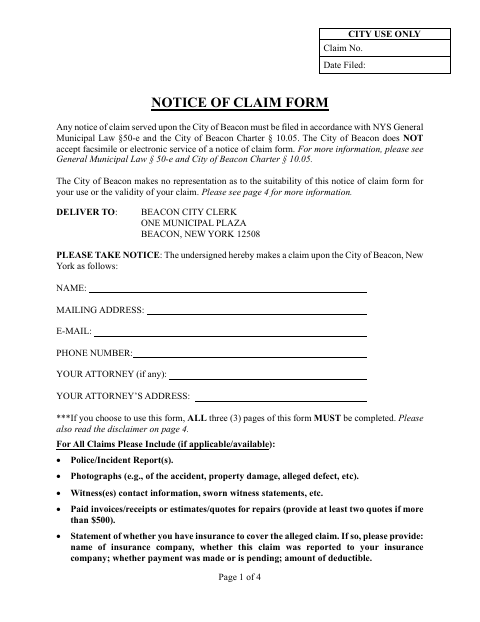
The Notice of Claim form lets a person notify the City of Beacon of an alleged injury, damage, or other claim and is filed with the Beacon City Clerk.
- licensed online notary
- ~15 min average
- Notarized PDF emailed
What you’ll need
- Government-issued photo ID
- Webcam-enabled device (laptop or phone)
- This form, ready to upload as a PDF
What this form is
Use this form to describe when, where, and how the claim arose, the nature of the claim, and any injuries or damage sustained. The City says a notice of claim must be served on the Beacon City Clerk within the applicable time period and does not accept electronic or fax service. Complete the required claim pages, review the disclaimer, and include relevant supporting documents if available.
Who needs it
A person making a claim against the City of Beacon for alleged injury or damage may use this form to notify the City Clerk.
Why it needs a notary
The form contains an individual acknowledgment, and the claimant whose name is signed must appear before a notary and acknowledge executing the instrument.
How to get this notarized
- 1
Download the Form
Get the Notice of Claim form from the City of Beacon and review its disclaimer and instructions.
- 2
Complete the Claim Sections
Describe when, where, and how the claim arose, the nature of the claim, and any injuries or damage.
- 3
Book an Online Notary
Schedule a video session with a commissioned online notary for the form's acknowledgment.
- 4
Sign on Video
Follow the notary's instructions and acknowledge your signature during the online session.
- 5
Serve the City
Deliver the completed notice to the Beacon City Clerk by personal delivery or registered or certified mail, as the form instructs.
Preview the form
The blank PDF straight from Beacon. Look it over, then upload your filled copy to start the notary session.

You’ll need ID and a webcam.
A licensed online notary will join you on video, verify your government-issued ID, witness your signature, and apply their seal. You’ll receive the notarized PDF by email when the session ends.
Frequently asked questions
- How do I notarize the Beacon Notice of Claim?
- Complete the claim sections, then meet with a commissioned online notary by video and acknowledge your signature. The form must still be served on the Beacon City Clerk by an accepted method; the City does not accept electronic or fax service.
- Do I need to sign the form in front of a notary?
- Yes. The form says a notice of claim must be signed before a licensed notary public. Its notarial block is an acknowledgment for the claimant.
- Can I file the notarized form online?
- No. The form states that the City of Beacon does not accept electronic service or delivery, or fax service. It directs claimants to serve the Beacon City Clerk by personal delivery or registered or certified mail through the U.S. Postal Service.
- What supporting documents should I include?
- If available and applicable, the form lists incident reports, photographs, witness contact information or sworn statements, repair invoices or estimates, and information about insurance coverage. Confirm with the city, town or village if unsure.
- Can an online notary notarize this form?
- New York authorizes remote online notarization by a commissioned online notary. You can acknowledge your signature during a video session, but notarization does not change the City's stated service requirements.
Notice of Claim in other Dutchess County cities
Each city publishes its own version of this form. Pick the city where you’re filing.