
Red Hook, NY · Dutchess County
Owner Consent Form
The Owner Consent Form authorizes an applicant who is not the property owner to file a building or land application and represent the owner before Red Hook’s Planning Board or Zoning Board of Appeals.
- licensed online notary
- ~15 min average
- Notarized PDF emailed
What you’ll need
- Government-issued photo ID
- Webcam-enabled device (laptop or phone)
- This form, ready to upload as a PDF
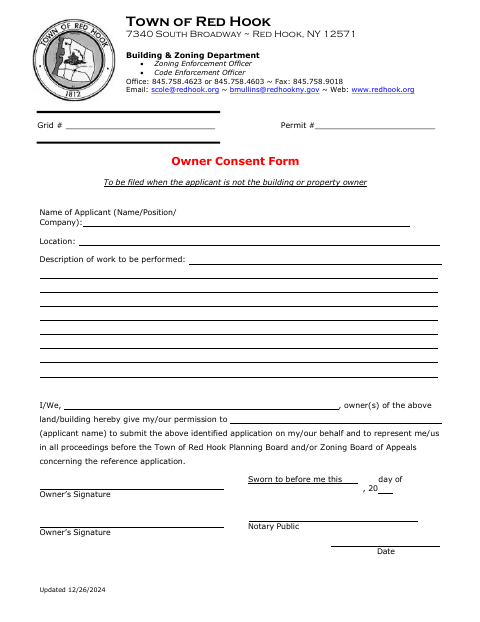
What this form is
This form is used when a building or property owner is not the applicant for an application. It identifies the applicant and work location, and lets the owner authorize that applicant to submit the application and represent the owner in proceedings before the Town Planning Board and/or Zoning Board of Appeals. The Town says to file it in that situation; the owner or owners sign and swear before a notary.
Who needs it
A property owner needs this form when someone else is applying and will submit the application or represent the owner before the Town’s Planning Board or Zoning Board of Appeals.
Why it needs a notary
The form includes a “Sworn to before me” jurat; each property owner giving consent signs before a commissioned online notary, who completes the notarial section.
How to get this notarized
- 1
Download The Form
Get the Owner Consent Form from the Town of Red Hook.
- 2
Fill In The Details
Enter the applicant’s name, location, and description of the work.
- 3
Book An Online Notary
Arrange a session with a commissioned online notary for the owner’s sworn signature.
- 4
Sign On Video
The owner signs during the online notarization, and the notary completes the jurat.
- 5
Submit To The Town
File the notarized form with the Town as part of the application.
Preview the form
The blank PDF straight from Red Hook. Look it over, then upload your filled copy to start the notary session.

You’ll need ID and a webcam.
A licensed online notary will join you on video, verify your government-issued ID, witness your signature, and apply their seal. You’ll receive the notarized PDF by email when the session ends.
Frequently asked questions
- How do I complete and submit the Owner Consent Form?
- Fill in the applicant, location, and work description, then have the property owner sign before a notary. File the completed form with the Town as part of the application.
- Do I need to sign this form in front of a notary?
- Yes. The form includes a “Sworn to before me” section for the property owner’s signature and the notary’s details.
- Can I notarize the form online?
- New York has authorized remote online notarization by commissioned notaries since 2023. You can arrange an online notarization with a commissioned online notary.
- Who should complete this form?
- The property owner should complete the consent when the applicant is not the owner and needs permission to submit the application or represent the owner in Town proceedings. Confirm with the city, town or village if unsure.
Other forms in Red Hook
Application for Area Variance
Red Hook
Application for Change of Non-Conforming Use
Red Hook
Application for Change of Non-Conforming Use
Red Hook
Application for Area Variance
Red Hook
Application for Use Variance
Red Hook
Affidavit of Exemption to Show Special Proof of Workers’ Compensation Insurance
Red Hook
Owner Consent Form in other New York cities
Each city publishes its own version of this form. Pick the city where you’re filing.